
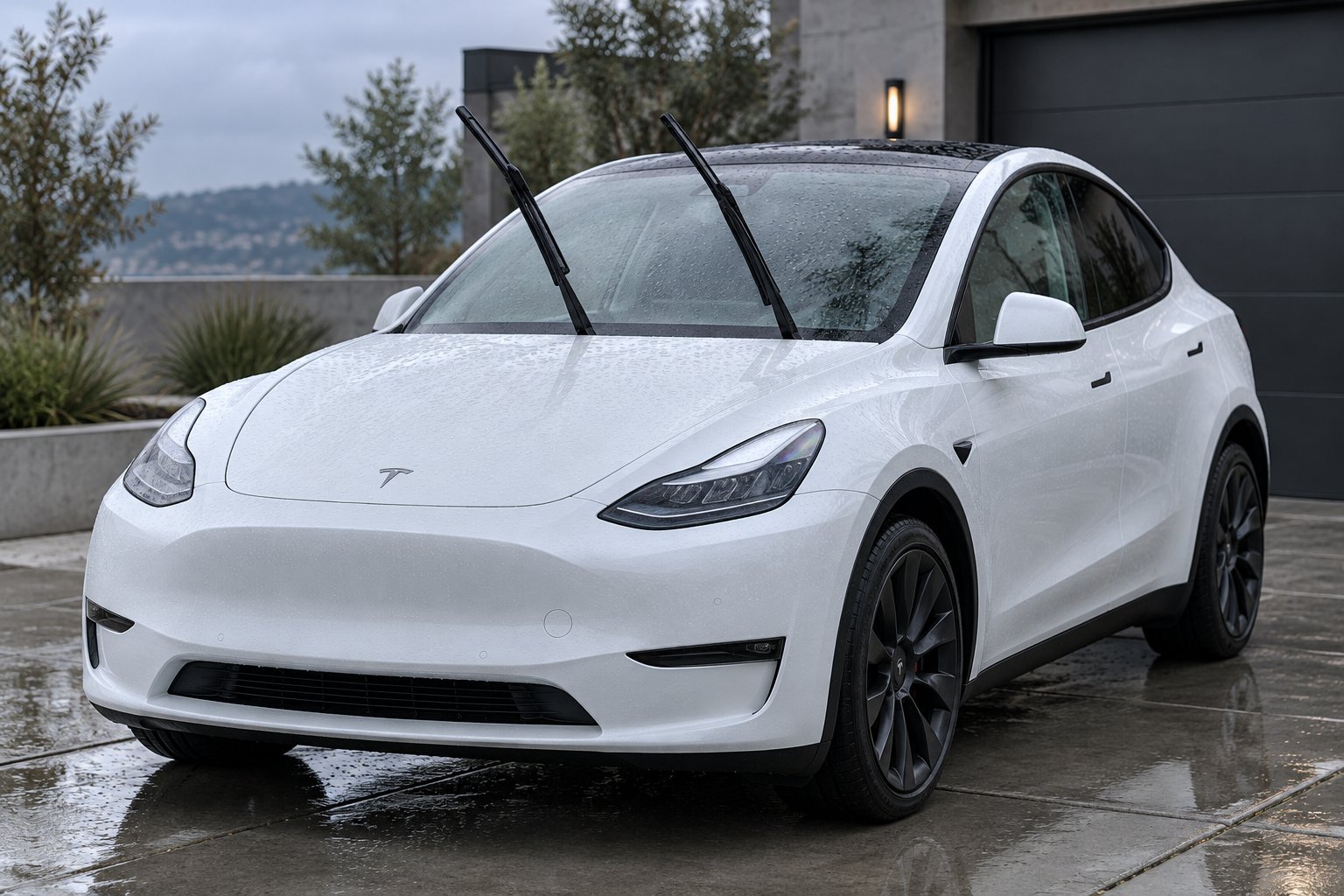
Tesla Model Y Wiper Blade Size at a Glance
Searching for the exact Tesla Model Y wiper blade size before you accidentally order the wrong set? Here is the quick answer:
The Tesla Model Y uses a 26-inch (650 mm) wiper blade on the driver side and a 19-inch (480 mm) wiper blade on the passenger side. There is no rear wiper blade.
That asymmetric pairing catches a lot of first-time buyers off guard. You'll need two different lengths, not a matching pair, so double-check your cart before hitting checkout.
Driver Side and Passenger Side Blade Dimensions
The longer 26-inch blade sits on the driver side (left) to sweep the widest possible arc directly in front of you. The shorter 19-inch blade covers the passenger side (right), matching the narrower section of the Model Y's curved windshield. Both Tesla wiper blades use the same Push Button 19mm connector, so the only difference between the two is length.
These dimensions apply across pre-refresh builds and the newer Juniper variant alike. Whether your Model Y rolled off the line in 2020 or 2025, you're shopping for the same driver and passenger sizes. Tesla's official DIY guide confirms that replacement blades must match these exact measurements and use the same connector type as the originals.
No Rear Wiper on the Tesla Model Y
If you're switching from a traditional SUV, this one might surprise you: the Model Y has no rear wiper. Many owners instinctively search for a three-blade set because virtually every other compact SUV includes a rear windshield wiper. The Model Y skips it entirely.
That means you only need to purchase two front Tesla windshield wipers, nothing more. Buying a kit that bundles a rear blade is a waste of money. Stick with a 26-inch driver-side blade and a 19-inch passenger-side blade, and you're fully covered.
Knowing the correct sizes, though, is only half the equation. The blade type and attachment connector matter just as much, and getting either one wrong leads to the same frustrating return process.
Wiper Blade Sizes for Every Model Y Production Year
One of the most common concerns among Tesla Model Y owners shopping for Tesla model Y wiper blades is whether their specific production year requires a different size. Imagine ordering a set online, only to discover they don't match your build. Fortunately, Tesla has kept things remarkably simple here.
Wiper Sizes Across Every Model Y Production Run
From the very first Model Y deliveries through the latest Juniper refresh, Tesla has maintained the same wiper blade dimensions. No mid-cycle changes, no trim-level variations, no regional differences in sizing. Whether you picked up a 2020 Long Range, a 2022 Performance, or a 2025 Juniper, you'll find the same 26-inch driver-side blade and 19-inch passenger-side blade under the hood line.
Here is a complete breakdown by production year:
| Production Year Range | Driver-Side Size | Passenger-Side Size | Notes |
|---|---|---|---|
| 2020 – 2022 (Initial Production) | 26 in (650 mm) | 19 in (480 mm) | All trims: Standard Range, Long Range, Performance |
| 2023 – 2024 (Mid-Cycle Updates) | 26 in (650 mm) | 19 in (480 mm) | No wiper size changes despite interior and suspension revisions |
| 2025+ (Juniper Refresh) | 26 in (650 mm) | 19 in (480 mm) | Exterior redesign; wiper blade sizing unchanged |
This consistency is a genuine advantage when it comes time for Tesla wiper blade replacement. You don't need to cross-reference VINs or decode build sheets. Every Model Y ever produced takes the same two blades, period. That kind of uniformity makes the shopping process straightforward and dramatically reduces the risk of ordering the wrong part.
Model 3 and Model Y Cross-Compatibility
Here's a detail that saves both money and headaches for multi-Tesla households: the Tesla Model 3 shares identical wiper blade sizes with the Model Y. Both vehicles use a 26-inch blade on the driver side and a 19-inch blade on the passenger side. Even the attachment mechanism is the same — a Push Button 19mm connector that clicks into a matching slot on the wiper arm.
What does this mean in practice? If you see a listing for Tesla Model 3 windshield wipers, those blades will also fit a Model Y. The platforms share enough windshield geometry and wiper arm hardware that blades marketed for one vehicle work seamlessly on the other. Not a Tesla App confirms this shared fitment, noting that the blade sizes and connector types align across both models for all production years.
This cross-compatibility is especially useful when buying in bulk or finding a deal on a multi-pack. A set labeled for the Model 3 won't leave you with incompatible hardware — the fit is identical. Just verify the listing includes the correct 26-inch and 19-inch pair and specifies the Push Button 19mm attachment, and you're set for either vehicle.
Keep in mind, though, that this interchangeability does not extend to every Tesla. The Model X windshield wipers, for example, use a different passenger-side length, and the Model S has its own sizing history depending on the production year. Cross-compatibility is a Model 3 and Model Y benefit specifically.
Knowing that your blade sizes are universal across years and shared with the Model 3 simplifies the purchase, but the blade itself still needs to be the right type. The construction style and connector design determine whether it actually performs well on your windshield — or just technically fits.
Wiper Blade Types and the Model Y Attachment System
A tesla wiper blade that matches the correct length doesn't guarantee a good fit. The construction style shapes how well the rubber contacts your windshield, and the connector determines whether the blade actually locks onto the arm. Picking the wrong combination means streaks, noise, or a blade that won't attach at all. Here's what you need to know about each design.
Beam Frameless vs Hybrid vs Conventional Blade Types
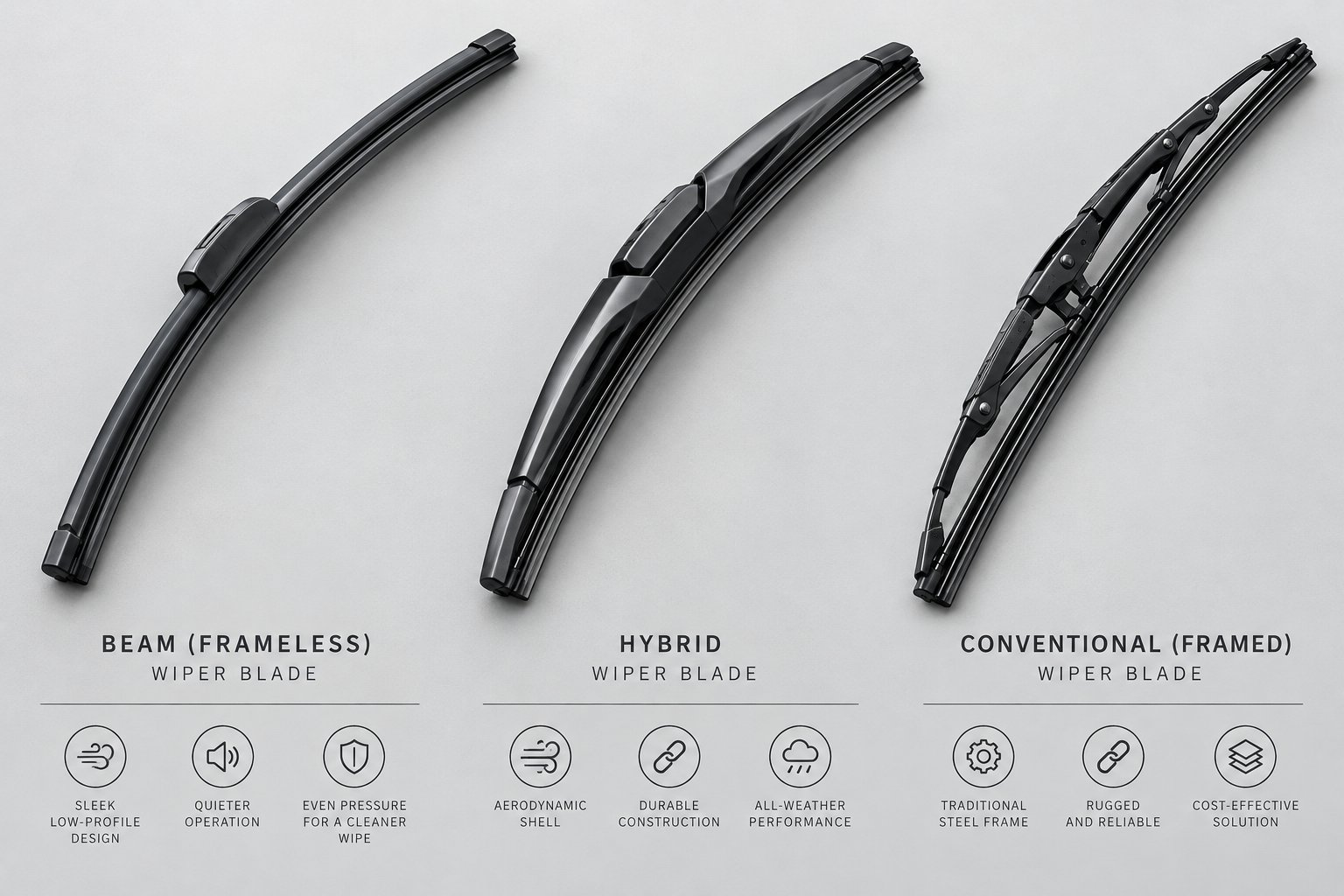
Three distinct wiper blade constructions dominate the market, and each one handles rain, snow, and debris differently. Understanding the differences helps you avoid a costly mismatch.
- Beam (frameless) blades rely on a single curved spring strip running the full length of the blade. This strip flexes to follow the windshield's curvature, creating constant contact between the rubber edge and the glass across the entire sweep. There's no exposed metal framework, so ice and debris have nothing to cling to. Wind actually pushes beam blades closer to the glass at highway speeds rather than lifting them away.
- Hybrid blades merge a pivoting internal metal frame with a sleek aerodynamic shell, typically made of engineered polymer. You get the structural rigidity of a traditional frame paired with improved airflow management. They perform well in heavy precipitation but can still freeze in extreme cold where ice builds up around the internal joints.
- Conventional blades use a rigid metal bracket frame with multiple pivot points, producing roughly six to eight contact spots against the glass. They're the most affordable option, but their straight profile struggles to conform to heavily curved windshields. Wind resistance can also pull them off the glass surface during storms.
Tesla equips the Model Y with beam-style frameless blades from the factory, and for good reason. The Model Y's windshield has a pronounced curvature that demands even pressure distribution across the full blade length. A conventional framed blade simply cannot track that curve consistently — you'll end up with missed patches and uneven wiping. This is why beam or frameless replacements are strongly recommended. Conventional framed blades are not a suitable substitute for any Tesla vehicle, whether you drive a Model Y, Model 3, or even the Cybertruck with its massive single tesla cybertruck wiper blade.
Hybrid blades can technically work, but they sacrifice some of the aerodynamic advantages that make beam blades the preferred choice. If you're replacing your wipers, stick with a beam-style design to match what Tesla engineered the vehicle around.
Understanding the Push Button 19mm Attachment
Even the perfect beam blade in the correct length won't do you any good if it uses the wrong connector. This is where many owners make an expensive mistake.
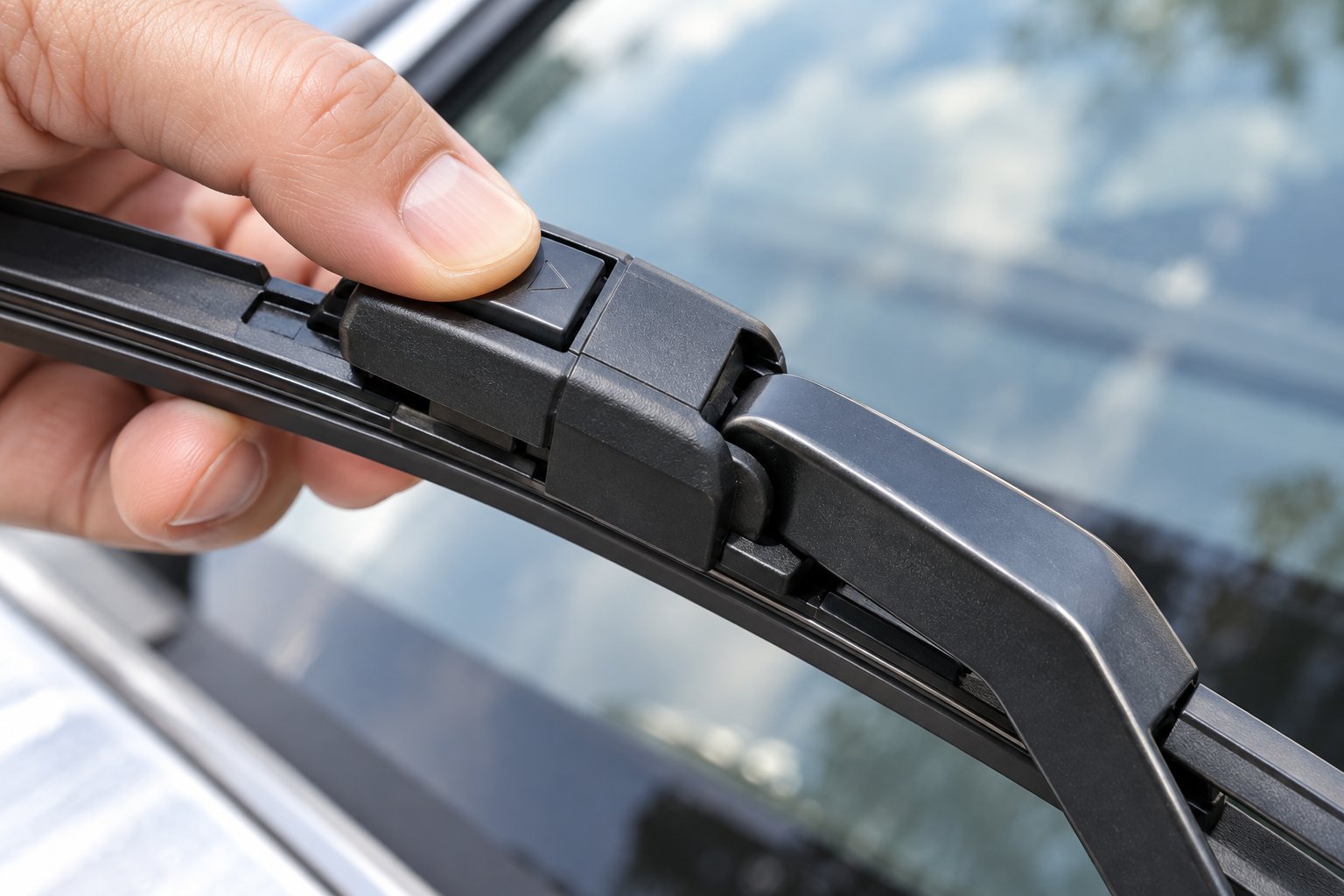
The Model Y uses a Push Button 19mm attachment — sometimes labeled "Narrow Push Button" by aftermarket retailers. Picture a small rectangular tab on the wiper arm that clicks into a matching slot on the blade's center mount. To remove an old blade, you press the release tab and slide the blade off. To install a new one, you slide it on until you hear a firm click. That's it — no tools, no wrestling with hooks or pins.
Wiper Blades USA identifies this exact connector type for the 2023 Model Y and provides visual confirmation of the narrow push button arm design. The same connector applies to every Model Y production year.
Here's the critical takeaway: the J-hook adapter that fits the majority of non-Tesla vehicles will not work on your Model Y. Neither will pin-style or wide push button connectors. Before adding any blade to your cart, look for explicit mention of "Push Button 19mm" or "Narrow Push Button" compatibility. Some aftermarket blades ship with a multi-adapter kit that includes the correct connector, but you should always verify rather than assume.
Silicone blade options are also available in this attachment format. Owners who want longer service life — particularly in harsh climates — can find silicone beam blades designed specifically for the Push Button 19mm connector without any adapter workarounds.
Getting the blade type and attachment right puts you ahead of most first-time buyers. But the Model Y's wiper system has a few more quirks that go beyond hardware — including software features and a camera dependency that make streak-free performance more important than you might expect.
Tesla-Specific Wiper Features Every Owner Should Know
On most cars, windshield wipers are purely a visibility tool. Streaky blades are annoying, sure, but they don't affect anything beyond your line of sight. The Tesla Model Y changes that equation. Between a forward-facing camera system that depends on a clean windshield and software-controlled wiper positioning that hides the arms beneath the hood line, your model y wiper blades serve a broader role than they would on any conventional vehicle.
Why the Autopilot Camera Makes Streak-Free Wipers Critical
Imagine driving on a rain-soaked highway with Autopilot engaged. Your Model Y's forward-facing camera — mounted directly behind the windshield — is scanning lane markings, reading traffic, and tracking the vehicles ahead. Every frame of visual data that camera captures passes through the same glass your tesla windshield wiper sweeps across. If a worn blade leaves smears, streaks, or water droplets in the camera's field of view, you're not just dealing with a visual annoyance. You're potentially degrading the system your car relies on to drive safely.
Tesla's own documentation confirms this connection directly. The Model Y owner's manual states that ineffective wipers can lead to "reduced visibility for the front windshield cameras, which may lead to degraded performance or unavailability of Self-Driving features." That's not a vague caution — it's a specific warning that your wiper condition directly influences whether features like Lane Departure Avoidance and Automatic Emergency Braking function as intended.
The Model Y's vision-based system also uses those cameras for self-calibration, a process that requires highly visible lane markings across multiple lanes. A streaky windshield during calibration — say, after a windshield replacement or a software update — could slow or complicate that process. Under normal conditions, calibration completes within 20 to 25 miles of driving. A dirty or poorly wiped windshield in low-visibility weather can stretch that distance considerably.
This is why keeping your wiper blades in good condition isn't just about comfort on a Tesla. It's a safety-adjacent maintenance item. Worn rubber that leaves haze or water trails in the upper portion of the windshield — right where the camera sits — can quietly undermine the very systems you depend on during the worst driving conditions. Replacing blades at the first sign of streaking protects both your visibility and your Autopilot performance.
Wiper Service Mode and Heated Wiper Park
Here's where the Model Y throws another curveball at owners accustomed to traditional vehicles. On most cars, replacing a wiper blade takes about 30 seconds: you lift the arm, swap the blade, and drop it back down. Try that on a Model Y without preparation, and you could damage the hood or the wiper arms themselves.
The reason? Tesla tucks the wiper arms beneath the hood line when they're in their resting position. This design keeps the windshield aerodynamically clean and reduces wind noise at highway speeds. The tradeoff is that you physically cannot access the blades without first moving the arms out from under that trim. Forcing them up manually risks bending the arms or scratching the hood's edge.
Tesla solves this with Wiper Service Mode. To activate it, tap Controls > Service > Wiper Service Mode on the touchscreen. The wipers automatically reposition to a raised, accessible stance. From there, you can safely lift each arm a short distance away from the glass — just far enough to reach the blade assembly. The owner's manual explicitly warns against lifting a wiper arm beyond its intended position, so keep the movement controlled. Place a towel between the arm and windshield as a precaution against accidental contact. When you're done, simply toggle Wiper Service Mode off and the arms return to their normal parked position beneath the hood line.
Cold-weather owners benefit from another thoughtful feature: heated wiper park. When you activate the Defrost function — either through the touchscreen or remotely via the Tesla mobile app — the base of the windshield where the wipers rest warms up to prevent ice from bonding the blades to the glass. Tesla's cold weather best practices recommend raising the wipers against the windshield when expecting snow or ice buildup, so they can defrost along with the glass. Some Model Y variants also include dedicated wiper defrosters for additional protection.
The heated wiper park feature works with any compatible replacement blade — OEM or aftermarket — as long as it meets the correct size and connector specifications. You don't need a special blade to take advantage of the warming function. This makes it a universally helpful feature whether you're running the factory originals, a silicone upgrade, or a third-party beam blade.
These software-driven features highlight just how different the Model Y ownership experience is from a conventional vehicle. But knowing your wipers are camera-critical and software-managed raises a practical question: how do you actually tell when your current blades have reached the end of their useful life?
When to Replace Your Tesla Model Y Wiper Blades
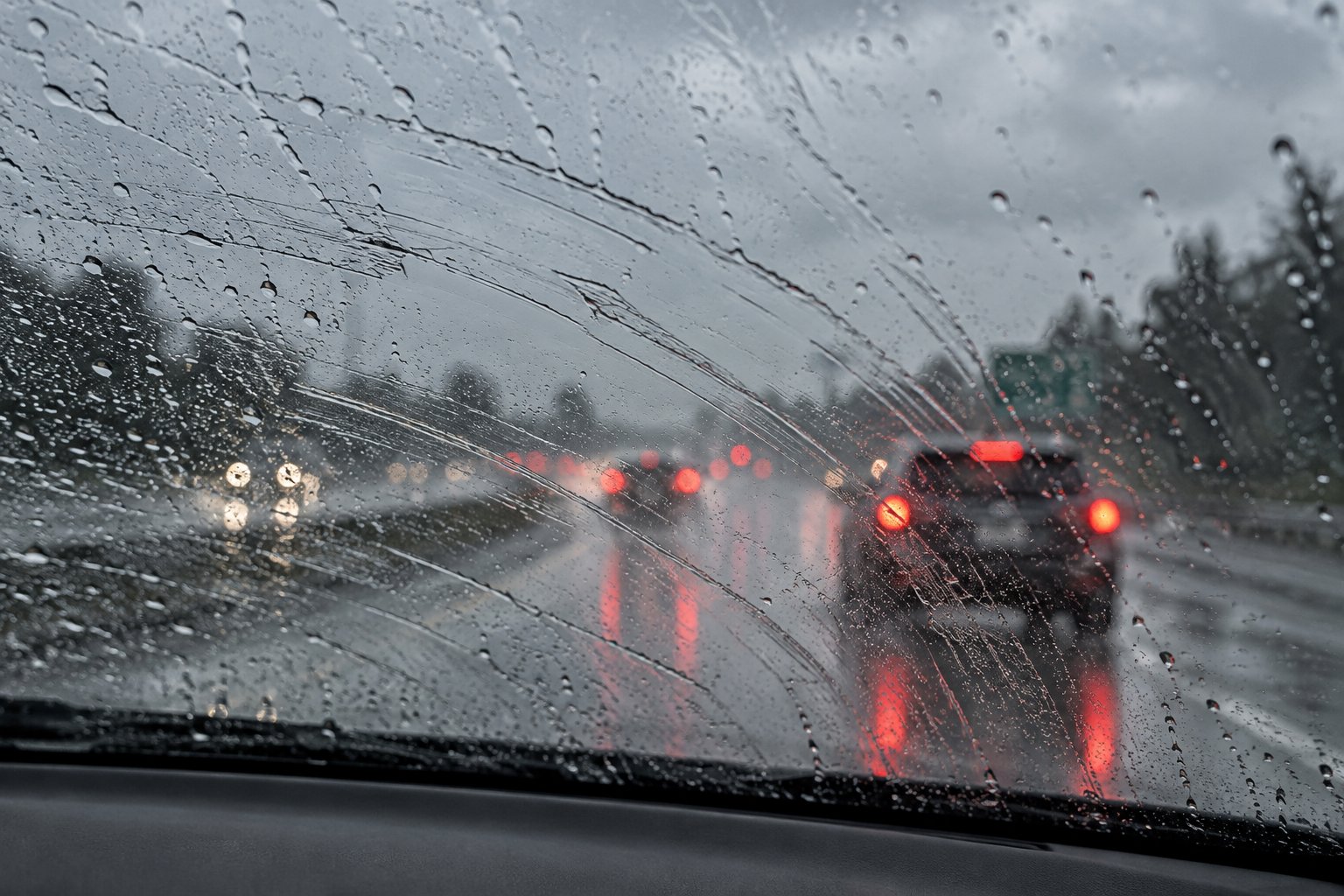
Wiper blades don't fail all at once. They deteriorate gradually, and that slow decline makes it easy to adapt to worsening performance without realizing just how bad things have gotten. You might unconsciously lean forward during rain, squint a little harder at night, or instinctively avoid using the wipers altogether. By the time the problem feels obvious, the rubber edge has usually been compromised for weeks. Knowing exactly what to look for helps you catch the decline early — before it affects your visibility or, on a Tesla, your Autopilot camera's optical path.
Visible Warning Signs of Worn Wiper Blades
When your tesla wipers start underperforming, the symptoms are consistent and easy to identify once you know what to watch for. If you notice any of the following, the blade's rubber edge has degraded to the point where it no longer makes uniform contact with the glass:
- Streaking or smearing across the windshield — Instead of clearing water in a single clean pass, the blade leaves behind thin lines of moisture or a hazy film. This happens when the rubber edge develops micro-cracks or loses its sharp wiping profile.
- Squeaking or chattering sounds during operation — A healthy blade glides silently. When the rubber hardens, warps from heat or prolonged sun exposure, or loses flexibility, it skips across the glass in a stuttering motion that produces an unmistakable noise.
- Visible cracks, tears, or splits in the rubber edge — Pick up each blade and run your finger along the wiping edge. If you feel rough patches, see hairline fractures, or spot chunks of rubber pulling away from the spine, the blade is well past its useful life.
- Uneven wiping with missed patches — Some areas of the windshield stay dry while others remain wet or smudged. This pattern indicates that the blade has lost consistent pressure against the curved glass, often because the rubber has flattened or the beam strip has weakened.
- The blade lifting away from the glass at highway speeds — Wind should press a properly functioning beam blade closer to the windshield. If you notice the blade hovering or bouncing at speed, the structural tension in the spring strip has likely failed, and the blade can no longer maintain contact under aerodynamic load.
Any single symptom on this list justifies a tesla windshield wiper replacement. Waiting for multiple signs to appear simultaneously just means you've been driving with reduced visibility — and a partially obstructed Autopilot camera — longer than necessary.
How Long Tesla Model Y Wiper Blades Typically Last
So how often should you actually expect to swap out your blades? For most drivers, wiper blades deliver reliable performance for roughly 6 to 12 months. That range is wide for a reason: your specific lifespan depends heavily on where you park, how often you drive in rain, and what kind of climate punishment your blades endure daily.
Several environmental factors accelerate that degradation timeline:
- Intense UV exposure — Parking outdoors in direct sunlight dries out rubber compounds faster than anything else. Owners in the Southwest, Florida, or any region with persistent sun may find their blades hardening and cracking well before the six-month mark.
- Extreme cold and ice — Freezing temperatures make rubber brittle, and scraping ice-covered windshields with active wipers can nick or tear the blade edge. Winter driving states often push owners toward the shorter end of the replacement cycle.
- Heavy or frequent rain — Constant use isn't necessarily harmful, but high-frequency wiping across a grit-covered windshield creates abrasive wear that gradually erodes the rubber's precision edge.
- Road salt and chemical exposure — Salt spray and certain windshield washer fluid chemicals can speed up rubber deterioration, especially in coastal or northern climates where roads are treated throughout winter.
Silicone blades tend to outlast traditional rubber by a significant margin in harsh conditions. Their material resists UV degradation and temperature extremes better than natural or synthetic rubber compounds, which is why some owners in punishing climates consider them a worthwhile upgrade despite the higher upfront cost.
Tesla's own approach to replacement timing is refreshingly practical. The official Model Y owner's manual recommends wiper blade replacements every year as a baseline interval and lists daily visual checks of wipers and washers among its routine inspection items. The manual also notes that actual replacement frequency depends on driving behavior, usage patterns, and environmental conditions — meaning you shouldn't wait for a calendar reminder if performance is already declining. Inspect your blades regularly and replace them the moment you notice streaking, chattering, or any visible rubber damage.
Recognizing when your blades need replacing is the first step. The next question most owners face is a practical one: which aftermarket brand actually delivers the best combination of performance, fitment, and value for the Model Y?
Best Aftermarket Wiper Blades for Tesla Model Y Compared
With dozens of brands claiming Tesla compatibility, picking the right tesla model y wiper blade comes down to verifiable specs — not marketing slogans. The wrong rubber compound wears out in weeks, the wrong connector sends you right back to the returns counter, and an oversized blade smacks into the windshield trim on every pass. You need a clear, side-by-side breakdown that filters out the noise.
Top Aftermarket Brands Side by Side
The following table compares the most widely available tesla windshield wiper blades that fit the Model Y's 26-inch and 19-inch sizing with the Push Button 19mm attachment. Prices reflect approximate per-blade costs and may vary by retailer.
| Brand | Blade Type | Attachment Compatibility | Approx. Price Per Blade | Key Features |
|---|---|---|---|---|
| CUTIM | Beam (frameless) | Push Button 19mm (Tesla Model 3/Y) | $20 – $30 | Natural-rubber blade, reinforced frame design; sold as a single blade — verify exact length and driver/passenger fitment with CUTIM before ordering |
| Bosch Icon | Beam (frameless) | Multi-adapter (includes Push Button) | $22 – $30 | Exclusive ClearMax 365 rubber compound; asymmetrical spoiler for even downforce; Car and Driver premium pick; widely recommended on Tesla forums |
| Rain-X Latitude Water Repellency | Beam (frameless) | Universal adapter kit (includes Push Button) | $18 – $26 | Integrated Rain-X hydrophobic coating transfers to windshield; quiet operation; Car and Driver best overall wiper blade |
| Rain-X Silicone Endura | Beam (frameless) | Universal adapter kit (includes Push Button) | $28 – $38 | Silicone rubber rated to last up to 2x longer than conventional rubber; strong UV and ozone resistance; locking clasp adapter |
| PIAA Si-Tech | Beam (frameless) | Push Button adapter available | $25 – $35 | Silicone blade with built-in water-repellent coating; Japanese engineering; excellent cold-weather durability |
| Michelin Endurance XT | Beam (frameless) | Multi-adapter (verify Push Button inclusion) | $18 – $25 | Smart-Flex technology for windshield contour adaptation; independent suspension system; moderate price point |
| Valeo Ultimate | Beam (frameless) | Multi-adapter (verify Push Button inclusion) | $16 – $24 | OEM supplier to multiple automakers; clean wipe edge design; budget-friendly pricing |
| Tesla OEM | Beam (frameless) | Push Button 19mm (exact fit) | $25 – $35 | Factory-original blade; guaranteed fitment and connector match; available through Tesla Service Centers and the Tesla online shop |
A few things stand out immediately. Every option worth considering is a beam-style frameless blade — no conventional framed designs make the cut for the Model Y. The Bosch Icon and Rain-X Latitude consistently rank at the top in independent testing, with EV Pulse calling the Bosch Icon a top pick specifically for Tesla vehicles. The Rain-X Silicone Endura and PIAA Si-Tech occupy the premium silicone tier for owners who want extended service life in harsh climates. And for those who prefer a natural-rubber option with a reinforced frame, CUTIM's Windshield Wiper for Tesla Model 3/Model Y enters the conversation as a noteworthy aftermarket contender — though because the listing covers a single blade without specifying its length, you'll want to confirm the exact dimensions and side fitment directly with CUTIM before placing your order.
How to Choose Between Brands
Staring at a table full of options can feel paralyzing. Here's how to narrow down the decision based on what actually impacts daily performance:
- Rubber compound — Natural rubber delivers smooth, quiet wiping at a lower cost but degrades faster under UV exposure. Silicone rubber resists heat, ozone, and freezing temperatures far better, often lasting twice as long. Rain-X's support documentation confirms that silicone blades are the stronger choice for extreme weather, while natural rubber blades remain more affordable for moderate climates.
- Frame rigidity — A reinforced spine distributes even pressure across the full blade length. Flimsy construction leads to uneven contact, missed patches, and premature wear at the edges. Brands like CUTIM specifically emphasize a reinforced frame design to address this concern.
- Noise levels — Squeaking and chattering aren't just irritating; they signal poor contact with the glass. Premium blades from Bosch and Rain-X consistently score well for silent operation in independent wiper testing. If cabin quietness matters to you — and in a near-silent EV, it absolutely does — prioritize blades with proven low-noise performance.
- Warranty coverage — Some brands offer limited warranties or satisfaction guarantees. Tesla OEM blades carry the peace of mind of factory backing, while aftermarket brands vary widely. Check the warranty terms before you buy, especially on premium-priced silicone blades.
- Price per blade — Budget matters, but so does replacement frequency. A $16 blade that lasts four months costs more annually than a $30 blade that lasts twelve. Think in terms of cost per month of clean wiping rather than sticker price alone.
Above all else, verify that any blade you're considering explicitly lists compatibility with the Tesla Model Y's Push Button 19mm connector. Universal adapter kits usually include the right piece, but "usually" isn't a guarantee when you're dealing with tesla model y wiper blades size specifics. Check the product listing, read the fine print on adapter inclusions, and confirm before you order.
Picking the right brand and blade gets you halfway to a clear windshield. The other half? Installing it correctly — a process that starts not with the blade itself, but with a quick tap on the Model Y's touchscreen.
How to Replace Tesla Model Y Wiper Blades Step by Step
You've identified the worn blades, picked the right replacements with the correct 26-inch and 19-inch sizing, and confirmed the Push Button 19mm connector. The new tesla model y windshield wiper blades are sitting on your kitchen counter. The entire swap takes less than ten minutes, requires zero tools, and can be done in your driveway or garage. But there's one critical step that trips up nearly every first-timer — and skipping it can cost you a scratched hood or a bent wiper arm.
Activating Wiper Service Mode on the Touchscreen
On a traditional car, you'd simply flip the wiper arms up from the windshield and get to work. Try that on a Model Y and you'll immediately understand why Tesla built a software-controlled workaround. The wiper arms rest tucked beneath the hood line when parked — a design choice that reduces aerodynamic drag and wind noise at speed. The downside? Those arms are physically trapped under the front hood trim. Yanking them upward without repositioning them first risks bending the arm mechanism or gouging the hood's painted edge.
Here's the fix. Before touching the wiper arms, walk to the touchscreen inside your Model Y and follow this path:
Controls > Service > Wiper Service Mode
Once you tap that toggle, the wipers automatically glide forward to a raised, accessible position — lifted clear of the hood trim and angled away from the windshield. You'll see both arms standing at attention, ready for you to work on them safely. The vehicle must be in Park with the wipers turned off before you activate this mode.
This isn't optional. The Tesla Model Y owner's manual explicitly instructs owners to engage Wiper Service Mode before any blade replacement. It also warns against lifting a wiper arm beyond its intended position, meaning you should only pull each arm far enough from the glass to access the blade — not force it into a fully vertical stance like you might on other vehicles. The arms do not lock into a lifted position, so handle them with a controlled grip.
Removing the Old Blade and Installing the New One
With Wiper Service Mode active and both arms raised, the actual blade swap is straightforward. No wrenches, no clips, no adapter gymnastics. Just a clean push-and-slide motion. Follow these steps exactly:
- Gently pull the wiper arm away from the windshield. Lift it just far enough to comfortably reach the blade assembly — a few inches of clearance is plenty. Place a folded towel between the arm and the windshield glass. If the arm slips from your hand, the towel prevents it from cracking or scratching the surface.
- Locate the Push Button release tab. Look at the center of the blade where it connects to the wiper arm. You'll see a small rectangular locking tab — this is the Push Button 19mm mechanism that holds the blade in place.
- Press the release tab and slide the old blade off the arm. Hold the wiper arm firmly with one hand. With the other, press the locking tab inward and slide the blade downward (away from the arm hook). It should release smoothly with minimal force. If it feels stuck, double-check that you're pressing the tab fully before pulling.
- Align the new blade's connector with the arm hook. Take your replacement blade — whether it's the 26-inch driver-side or 19-inch passenger-side — and orient the connector slot so it lines up with the hook on the wiper arm.
- Slide the new blade upward until it clicks securely into place. Push the blade onto the arm hook until you hear and feel a distinct click. This confirms the locking tab has engaged. Give the blade a gentle push-pull test to verify it's locked. If it wobbles or slides, it hasn't seated properly — reposition and try again.
- Gently lower the arm back onto the windshield. Remove the protective towel and carefully guide the arm down to the glass. Don't let it snap back — lower it in a controlled motion to avoid chipping the windshield.
- Repeat the process for the second blade. Remember that your tesla wiper blades model y setup uses two different lengths. The 26-inch blade goes on the driver side, the 19-inch on the passenger side. Double-check that each blade matches its correct position before locking it in.
- Exit Wiper Service Mode on the touchscreen. Head back to Controls > Service > Wiper Service Mode and toggle it off. The arms will automatically return to their normal parked position beneath the hood line.
Once the arms settle back into their resting spot, run a quick functional test. Use the touchscreen wiper controls or trigger the washer fluid spray to cycle the blades across the windshield. Watch for smooth, even contact across the entire sweep — no skipping, no gaps, no unusual sounds. If one blade lifts, chatters, or leaves streaks on its very first pass, it likely didn't click fully into the connector. Pull it back into service position and reseat the blade before driving.
The whole job, from activating service mode to testing the finished result, typically takes five to eight minutes. No appointment at a service center, no specialty tools, no greasy hands. It's one of the simplest maintenance tasks on the Model Y — as long as you respect the service mode requirement and match each blade to the correct side.
A clean installation doesn't always guarantee perfect results, though. Some owners finish the swap only to encounter squeaking, streaking, or blades that don't quite sit flush. Most of these issues trace back to a handful of avoidable purchasing and installation mistakes.
Common Mistakes When Buying Model Y Wiper Blades
Every one of these errors leads to the same outcome: wasted money, a second trip to the checkout page, and a set of useless blades sitting in your garage. The frustrating part? They're all completely avoidable. Whether you're shopping for wiper blades for tesla model y 2024 or replacing worn rubber on a 2023 tesla model y wiper blade size match, these are the traps that catch owners over and over again.
Wrong Adapter and Incorrect Blade Length Mistakes
Most purchasing errors fall into four predictable categories. If you can dodge these, you'll get the right blades on the first try:
- Buying blades with J-hook adapters instead of the Push Button 19mm connector. The J-hook is by far the most common wiper arm attachment in the automotive world, so it shows up as the default option on countless product listings. Tesla's wiper arm looks deceptively similar to a standard hook design, but it's subtly different — the opening is narrower and the hook depth is slightly longer than a traditional J-hook. A blade built for a standard hook either won't click in at all or will attach loosely enough to pop off during heavy rain at highway speeds. Always confirm the listing explicitly states Push Button 19mm or Narrow Push Button compatibility before ordering.
- Purchasing a three-blade set that includes a rear wiper. Plenty of SUV wiper kits bundle a driver blade, a passenger blade, and a shorter rear blade in one package. The Model Y has no rear wiper — period. If you grab a three-pack designed for a conventional SUV, you're paying for a blade you'll never use. Worse, some of these kits include two identically sized front blades plus the rear blade, which leads directly to the next mistake.
- Selecting two blades of the same length instead of the correct 26-inch and 19-inch asymmetric pair. The Model Y's driver-side blade is seven inches longer than the passenger-side blade. Ordering a matched pair — two 26-inch blades or two 19-inch blades — means one side either won't fit or won't cover the windshield properly. Always verify you're getting one 26-inch and one 19-inch blade. Listings for tesla model 3 wipers follow the same asymmetric sizing, so cross-referenced kits should still include both lengths.
- Choosing conventional framed blades that don't conform to the Tesla windshield curvature. Traditional bracket-style wiper blades use a rigid metal frame with multiple pivot points. They're cheap and available everywhere, but they simply cannot track the Model Y's pronounced windshield curve consistently. You'll end up with missed patches, uneven pressure, and potential system warnings triggered by incomplete wiping. Stick with beam-style frameless blades — the same construction Tesla uses from the factory.
One more subtle trap worth flagging: vague "Tesla-compatible" labeling. Some aftermarket manufacturers slap that phrase on packaging without specifying which models, which connector types, or which blade lengths are actually supported. A blade labeled "Tesla-compatible" might technically attach to the arm yet still fit poorly or cause system errors. Look for listings that name the specific model (Model Y, Model 3), state the Push Button 19mm connector type, and list both the 26-inch and 19-inch blade lengths individually.
Post-Installation Troubleshooting
You've installed the new blades, toggled off Wiper Service Mode, and triggered a test cycle. But instead of a smooth, silent sweep, something feels off. Before you assume the blades are defective, work through these common post-installation issues:
New blades squeak on every pass. This is the most frequent complaint, and it's usually harmless. Fresh rubber needs a brief break-in period — a few rain cycles or washer fluid sprays — to conform to the windshield's surface profile. The more likely culprit, though, is residue on the glass itself. Oily films from road spray, tree sap, or even the protective coating on new blades create friction that produces that irritating chatter. Clean the entire windshield with a quality glass cleaner and wipe down the rubber edge of each blade with a damp cloth. Grime and dirt buildup on either the glass or the blade surface is one of the most common causes of persistent squeaking, even on brand-new wipers. In most cases, the noise disappears within a day or two of normal use once the surfaces are clean.
Streaking or water trails remain after each wipe. If the blade leaves thin lines of moisture or a hazy film, the first thing to check isn't the blade — it's the connector. Streaking on a brand-new blade almost always means it didn't fully click into the Push Button 19mm locking tab. Head back to Controls > Service > Wiper Service Mode, lift the arm, and press the blade firmly until you hear that definitive click. Give it a push-pull test to confirm it's locked. A blade that's 90% seated can look installed but still wobble just enough to lose consistent glass contact across the full sweep.
The blade doesn't sit flush against the windshield. When a freshly installed blade hovers slightly above the glass or only contacts in patches, the most likely explanation is a connector mismatch. You may have installed a blade with the wrong adapter — perhaps a wide push button or a pin-style connector that seemed to attach but doesn't engage the arm's hook geometry properly. Remove the blade, inspect the adapter, and compare it against the original factory blade's connector. If the profiles don't match, you've got an incompatible attachment type, and no amount of adjusting will fix it. Return the blade and order one with verified Push Button 19mm fitment.
Problems persist after confirming correct installation. If you've cleaned the windshield, verified the click, confirmed the right connector, and the blade still chatters, streaks, or lifts — the blade itself may be defective. Manufacturing inconsistencies happen, especially with budget-priced options. A warped rubber edge or an unevenly tensioned spring strip won't perform correctly no matter how perfectly you install it. Return the blade under warranty or the retailer's return policy and try a replacement from the same brand or switch to a different manufacturer entirely.
Most post-installation headaches resolve within minutes once you identify the root cause. The pattern is almost always the same: either the glass wasn't clean, the blade wasn't fully seated, or the wrong adapter slipped through the ordering process. Catching these issues early — ideally during that first test cycle in your driveway — saves you from discovering a problem at 70 mph in a downpour.
Avoiding these mistakes puts you in a strong position, but there's one more variable that affects long-term blade performance more than most owners realize: your local climate. The rubber compound that thrives in a mild coastal environment may fall apart in six weeks under desert sun or Midwest ice.

Choosing the Right Tesla Model Y Wiper Blade for Your Climate
A blade that performs flawlessly in San Diego may crack and chatter within weeks in Minneapolis. The rubber compound you choose matters almost as much as getting the correct size, and your local weather dictates which material will actually hold up between replacements. Think of it this way: you wouldn't put summer tires on a car headed into a blizzard, and the same logic applies to your tesla model y wiper blades.
Matching Blade Material to Your Climate
Wiper blade materials fall into three practical categories, each suited to a specific range of driving conditions. Matching the right compound to your environment keeps the windshield clear longer and reduces how often you're buying replacements.
Cold climates with ice, snow, and freezing temperatures. Silicone blades are the strongest choice here. Unlike natural rubber, silicone doesn't stiffen or become brittle when temperatures drop below freezing. It resists the cracking that ice crystals and road salt accelerate in conventional rubber compounds. Road & Track's testing highlights PIAA Si-Tech Silicone blades for their exceptional cold-weather durability, and the Rain-X Silicone Endura is rated to last up to twice as long as standard rubber in harsh conditions. Yes, silicone blades cost more upfront — often $28 to $38 per blade versus $16 to $26 for rubber — but that premium pays for itself when you're not replacing blades every three to four months through a brutal winter. If your Model Y regularly sits in sub-freezing overnight temps or endures frequent ice scraping, silicone is the clear winner.
Moderate climates with mild seasons and occasional rain. Standard beam blades with natural rubber deliver excellent performance without the price premium. In regions where temperatures stay between roughly 30°F and 90°F year-round and extreme weather events are rare, natural rubber maintains its flexibility and wiping precision for a solid 6 to 12 months. Brands like Rain-X Latitude and Bosch Icon use advanced rubber compounds that resist UV degradation better than budget alternatives while keeping per-blade costs in the $18 to $30 range. For most drivers in the Pacific Northwest, mid-Atlantic, or similar temperate zones, natural rubber beam blades hit the sweet spot between cost-effectiveness and reliable performance.
Regions with extreme temperature swings. If your area goes from triple-digit summers to single-digit winters — think the Midwest, Mountain West, or parts of the Northeast — you need a blade material that handles both ends of the spectrum. Premium all-season blades with enhanced rubber formulations, like the Bosch Icon's ClearMax 365 compound, are engineered specifically for this kind of thermal cycling. Silicone blades also excel in swing climates because the material doesn't degrade under UV exposure the way standard rubber does, and it bounces back from freezing without losing its edge profile. The investment makes sense when a single blade needs to survive July heat and January ice without replacement.
One detail worth emphasizing: regardless of material, every replacement tesla wiper you install should be a beam-style frameless design. Conventional framed blades lack the flex to track the Model Y's curved windshield in any climate, and hybrid designs sacrifice aerodynamic performance that matters at highway speeds. The material choice is about longevity and weather resistance; the blade construction is non-negotiable.
Your Pre-Purchase Checklist Before Ordering
Before you click "Add to Cart" on any wiper blade listing, run through every item on this list. Skipping even one of these checks is how owners end up paying twice — once for the wrong blades and again for the right ones.
- Confirm the driver-side blade is 26 inches (650 mm). This is the longer blade that sweeps the widest arc directly in your line of sight. Do not accept a 24-inch or 28-inch substitute.
- Confirm the passenger-side blade is 19 inches (480 mm). The shorter blade covers the right side of the windshield. Some listings round this up to 20 inches — Tesla's official DIY documentation lists the passenger blade as 20 inches (500 mm), so either 19-inch or 20-inch designations are acceptable depending on the manufacturer's measurement convention. When in doubt, match the length printed on your current blade.
- Verify the Push Button 19mm attachment type. This is the single most common point of failure in wiper purchases. Look for explicit mention of "Push Button 19mm," "Narrow Push Button," or "Tesla Model Y compatible connector" in the product description. J-hook, pin-style, and wide push button adapters will not fit.
- Select a beam or frameless blade style — not conventional. The Model Y's windshield curvature requires even pressure distribution that only a beam-style construction provides. Conventional framed blades are incompatible with every Tesla model.
- Ensure the order includes exactly two blades — no rear wiper needed. The Model Y has no rear wiper. If the listing bundles three blades or includes a rear blade in the package, it's designed for a different vehicle. You need one 26-inch and one 19-inch blade, nothing more.
- Check that the listing specifies Tesla Model Y compatibility. Generic "universal fit" claims are unreliable. The product page should name the Model Y by model, confirm the connector type, and ideally list the tesla model 3 wiper size as cross-compatible (since both vehicles share identical blade specifications).
For owners who want a natural-rubber option with a reinforced frame designed specifically for Tesla vehicles, CUTIM's Windshield Wiper for Tesla Model 3/Model Y is one option worth exploring. The blade features a beam-style construction with a reinforced frame intended to maintain consistent windshield contact. One important note: CUTIM's listing covers a single blade, so you'll need to confirm the exact blade length (26-inch or 19-inch) and whether it's designated for the driver or passenger side directly with CUTIM before ordering. Running through the checklist above with any brand — CUTIM included — ensures you get exactly what your Model Y needs without a return trip.
Wiper blades are one of the lowest-cost, highest-impact maintenance items on any vehicle. On a Tesla Model Y, where a clean windshield directly supports both your visibility and the Autopilot camera's performance, getting this small detail right protects far more than your comfort. Armed with the correct sizes, the right blade material for your climate, and a verified pre-purchase checklist, you'll swap your blades once, correctly, and move on — exactly the way it should work.
Frequently Asked Questions About Tesla Model Y Wiper Blade Size
1. What size wiper blades does a Tesla Model Y take?
The Tesla Model Y requires a 26-inch (650 mm) wiper blade on the driver side and a 19-inch (480 mm) wiper blade on the passenger side. These sizes have remained consistent across every production year from 2020 through the 2025 Juniper refresh, covering all trims including Standard Range, Long Range, and Performance. The Model Y does not have a rear wiper, so you only need two front blades. Both blades use a Push Button 19mm connector, and the same sizes also fit the Tesla Model 3.
2. Does the Tesla Model Y have a rear wiper blade?
No, the Tesla Model Y does not have a rear wiper blade. This surprises many owners who are switching from traditional SUVs, which almost always include a rear windshield wiper. Because there is no rear wiper assembly on any Model Y variant, you should avoid purchasing three-blade kits designed for conventional SUVs. You only need to buy two front blades — a 26-inch for the driver side and a 19-inch for the passenger side — to fully equip your vehicle.
3. Are Tesla Model Y and Model 3 wiper blades interchangeable?
Yes, the Tesla Model 3 and Model Y share identical wiper blade sizes and the same Push Button 19mm attachment connector. Both vehicles use a 26-inch driver-side blade and a 19-inch passenger-side blade. This means any wiper blade set marketed for the Model 3 will also fit the Model Y, and vice versa. This cross-compatibility is useful when shopping for deals or buying in bulk. However, this interchangeability does not extend to the Model S or Model X, which use different sizing depending on the production year.
4. How do I activate Wiper Service Mode on a Tesla Model Y?
To activate Wiper Service Mode, tap Controls > Service > Wiper Service Mode on the Model Y's touchscreen while the vehicle is in Park with wipers turned off. The wiper arms will automatically move to a raised position, clearing the hood trim so you can safely access and replace the blades. This step is essential because the Model Y's wiper arms rest tucked beneath the hood line when parked. Attempting to lift them manually without activating service mode risks bending the arms or scratching the hood. After replacing the blades, toggle the mode off and the arms return to their resting position.
5. What type of wiper blade attachment does the Tesla Model Y use?
The Tesla Model Y uses a Push Button 19mm connector, sometimes called a Narrow Push Button by aftermarket retailers. It features a small rectangular locking tab on the wiper arm that clicks into a matching slot on the blade assembly. This is different from the J-hook adapter found on most non-Tesla vehicles, so standard universal wiper blades typically will not fit. When shopping for replacements, always verify that the product listing explicitly states Push Button 19mm compatibility. Brands like CUTIM offer blades specifically designed for the Tesla Model 3 and Model Y with this connector type, though buyers should confirm exact blade length and side fitment before ordering.