
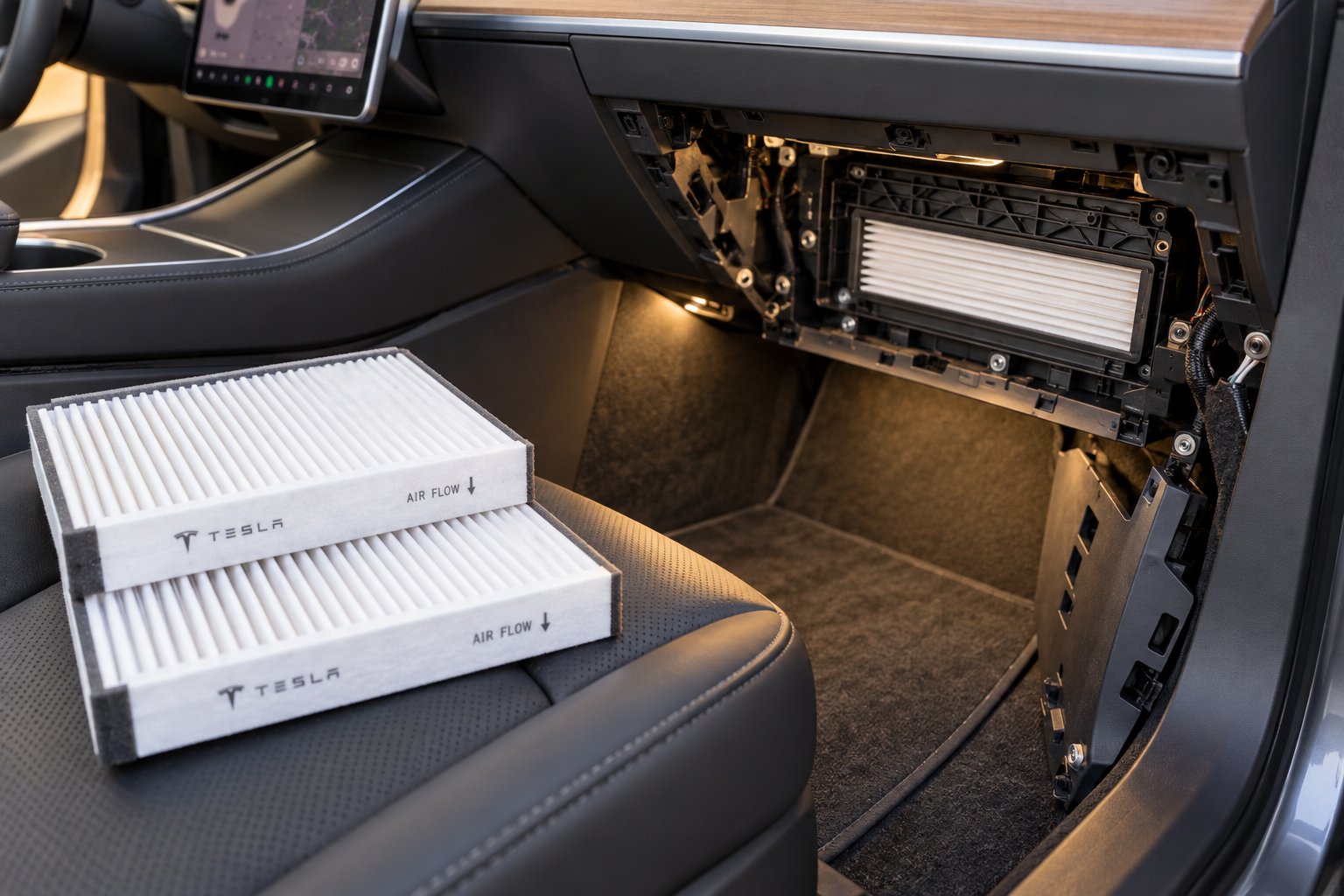
Why Your Tesla Model 3 Cabin Air Filter Deserves Attention
Imagine someone handed you a 15-minute task that improves the air you breathe on every single drive. That's exactly what a Tesla Model 3 cabin air filter replacement offers — a quick, affordable DIY job that delivers an outsized payoff in comfort and cabin air quality. Whether you've owned your Model 3 for years or just drove it off the lot, this is one maintenance skill worth picking up.
Tesla ownership is a unique experience. There's no traditional dealership down the street, no oil-change shop waving you in every 5,000 miles. You either schedule a service center visit, request mobile service through the app, or — and this is the empowering part — handle routine upkeep yourself. The cabin air filter sits right in that sweet spot of jobs you can absolutely tackle on your own, regardless of your mechanical background. This guide covers every Model 3 variant so you can follow along with confidence no matter which build you drive.
What the Cabin Air Filter Actually Does
Your Model 3's cabin air filter lives in the HVAC airflow path, quietly screening every breath of outside air before it reaches your vents. It captures pollen, road dust, exhaust particulates, and other airborne debris that would otherwise end up in your lungs. Think of it as the gatekeeper between highway pollution and your passenger compartment.
Two main types exist. A standard particulate filter handles dust and pollen effectively — similar in concept to filtering well water through a basic sediment screen. An activated carbon filter goes further by adsorbing volatile organic compounds (VOCs), exhaust fumes, and stubborn odors, much like a cooking oil filter traps residue you don't want cycling back into your food. For most drivers, the activated carbon option delivers noticeably fresher cabin air.
Why Tesla Owners Should Care About This Maintenance Task
Because your Model 3 skips traditional engine maintenance — no oil changes, no spark plugs, no timing belts — the cabin air filter is one of the few consumable items that actually requires periodic attention. Tesla's own maintenance schedule recommends replacing it every two years. Neglect it and you'll notice reduced airflow from your vents, a musty smell when the climate system kicks on, and added strain on the HVAC blower motor that can shorten its lifespan over time.
A UCLA study found that high-efficiency cabin filters paired with closed windows cut in-cabin PM2.5 levels by 37% in real-world driving. That's a meaningful difference for anyone commuting in traffic or living in areas with poor air quality. Could you take my picture of the old filter before pulling it out? That quick snapshot trick — covered later in the step-by-step section — saves headaches during reassembly.
Replacing the cabin air filter is a low-cost, high-impact maintenance item every Tesla Model 3 owner should know how to do. It protects your health, preserves HVAC performance, and takes less time than a lunch break.
The real question isn't whether this job is worth doing — it's knowing exactly where your specific Model 3 keeps its filter and what you'll find when you open the panel.
Locating the Cabin Air Filter in Every Model 3 Variant
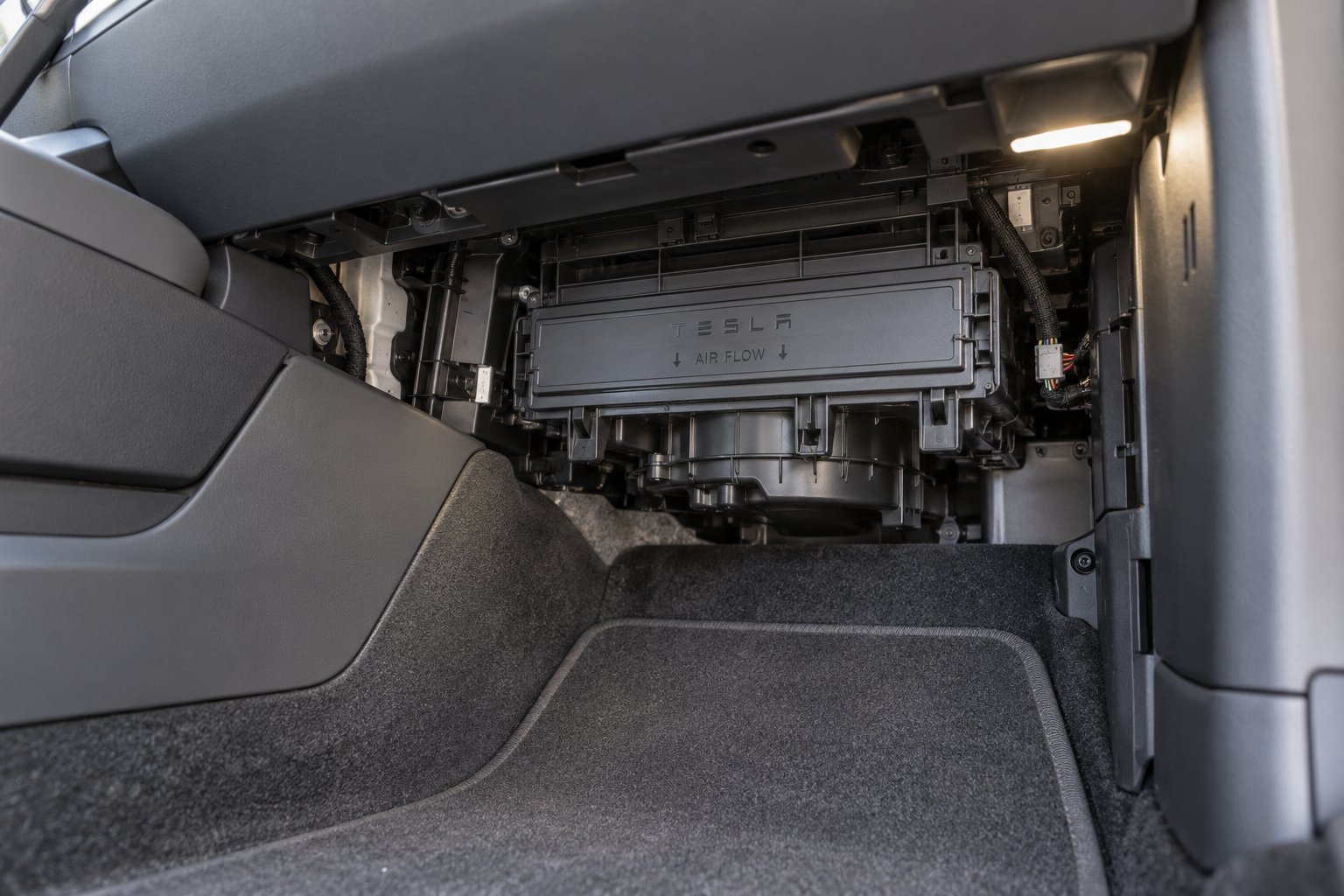
Finding the filter is half the battle. Every Model 3 hides its cabin air filters behind panels on the passenger side of the dash, but the exact access method depends on when your car rolled off the production line. Before you grab a single tool, take 60 seconds to confirm which version you're working with — it'll save you from prying the wrong panel or hunting for a screw that doesn't exist on your build.
Filter Location on Pre-Refresh Models
On earlier Model 3 builds (2017 through early 2023 production), the cabin air filter assembly sits inside the HVAC module behind the lower dash area on the passenger side. You'll access it by first removing the front footwell cover beneath the glove box — it's held in place by push clips and connects to a light and a speaker via two electrical connectors you'll need to unplug. A separate side panel along the center console also needs to come off to expose the rectangular filter housing cover.
That housing cover is secured by a T20 Torx screw — though on some vehicles it's a T20/6mm hybrid fastener, and certain later pre-refresh builds switched to squeeze-to-release locking tabs instead. Two filter elements stack vertically inside the housing, each with a small pull tab that folds inward for clearance. Think of the arrangement like two slim trays in a drawer: upper filter on top, lower filter beneath, both filtering incoming air before it reaches your vents. The concept isn't far from a filter in humidifier setups where layered media traps progressively finer particles.
Filter Location on Refreshed and Highland Variants
Tesla streamlined the design on the 2024+ Model 3 Highland. The filters still live on the passenger side behind a lower panel, but access is noticeably easier. The under-dash panel is held by magnets rather than push clips, so it lifts away without prying. The filter oil housing cover no longer requires a Torx screw — it uses a simple plastic tab you pop off by hand. Two filters still stack vertically, and the airflow arrow orientation remains the same (pointing toward the rear of the vehicle).
This is a welcome change. Owners familiar with fuel filter replacement intervals on traditional cars know that simpler access points mean fewer broken clips and faster service. Confirm your production year through your Tesla app or the vehicle's "About" screen under Software before starting — Highland panels and pre-refresh panels are not interchangeable, and forcing the wrong removal method can crack trim pieces.
HEPA Filter vs. Standard Cabin Filter — Know Which You Have
Here's where confusion creeps in. Some Model 3 configurations include an external HEPA filter assembly — a larger, separate unit that's part of Tesla's Bioweapon Defense Mode system. This is not the same component as the internal cabin air filters behind your dash. Treating them as interchangeable is like swapping dust collector filter bags into a shower head with filter housing — wrong size, wrong location, wrong job entirely. A whole house water filter for well water serves a completely different purpose than a faucet screen, and the same logic applies here.
| Filter Type | Location | Typical Filter Count | Replacement Complexity |
|---|---|---|---|
| Standard Cabin Filter | Behind lower dash panel, passenger side | 2 elements (stacked) | Beginner-friendly — 15 to 30 minutes |
| HEPA Filter Assembly | External housing (front trunk area on equipped vehicles) | 1 large element | Moderate — more disassembly required |
This guide focuses on the internal cabin air filters — the pair behind the dash that every Model 3 has. If your vehicle also features the HEPA assembly, that's a separate procedure with its own parts and steps. Knowing which component you're after before you start ensures you order the right filters and open the right panel — a small detail that keeps this job firmly in "lunch break" territory.
Signs Your Cabin Air Filter Needs Replacing
Knowing where the filters live is step one. But how do you know when they've actually worn out? Your Model 3 won't flash a dashboard warning or send a push notification when the cabin air filters hit their limit. Instead, the car communicates through subtler cues — and once you know what to listen, smell, and feel for, you'll catch a tired filter long before it becomes a real problem.
Sensory Clues That Your Filter Is Failing
Picture this: you hop into your Model 3 on a warm morning, tap the climate controls, and catch a whiff of something musty the moment the system cycles on. That stale, damp-closet smell is one of the earliest and most recognizable symptoms of a clogged cabin air filter. Bacteria and mold colonies thrive on the trapped organic material inside a saturated filter, and every time the blower activates, it pushes those odors straight into the passenger compartment.
Smell isn't the only giveaway. You'll also notice reduced airflow from the vents — even at the highest fan setting, the breeze feels weaker than it used to. That happens because a layer of accumulated dust, pollen, and particulates is physically blocking air from passing through the filter media. The blower motor compensates by spinning harder, which creates a noticeably louder fan noise. Over time, that extra strain can shorten the motor's lifespan and lead to a costly HVAC repair — a scenario that makes the modest air filter replacement cost look like pocket change by comparison.
Other drivers report visible dust or fine debris settling on dash vents and interior surfaces more quickly than usual. If passengers with allergies start sneezing more frequently on rides, or if your eyes feel irritated during commutes, the filter is likely no longer trapping the pollen and particulates it was designed to catch. Discount Filters notes that a dirty cabin air filter fails to effectively screen out allergens, leading to contaminated air circulating inside the vehicle — a particular concern for anyone with asthma or seasonal sensitivities.
- Musty or stale odor when the climate system turns on — caused by mold and bacteria growth on the old filter media.
- Reduced airflow from vents even at high fan speeds — debris is physically restricting the air path.
- Louder-than-normal fan noise — the blower motor is working overtime to push air through the blockage.
- Visible dust on dash vents or interior surfaces accumulating faster than usual.
- Increased allergy symptoms for passengers — sneezing, itchy eyes, or respiratory irritation during drives.
- Weak heating or cooling performance — the HVAC system can't move enough conditioned air to reach the set temperature efficiently.
Any single symptom is worth investigating. Two or more appearing together? That's your car telling you the filters are overdue for a swap.
Replacement Interval Guidelines
So how often should you actually replace them? Tesla's official maintenance schedule recommends cabin air filter replacement every two years. That interval works well as a baseline for drivers in moderate climates with typical commuting patterns.
Your driving environment, however, can shorten that window dramatically. Owners in dusty, high-pollen regions — think the American Southwest or the agricultural Central Valley — may find the filters clogging well before the two-year mark. The same goes for urban stop-and-go commuters regularly breathing in heavy exhaust and brake dust from surrounding traffic. If you've ever driven through wildfire smoke season on the West Coast, you already know how quickly airborne particulates overwhelm a filter. Even something as simple as living near an active construction zone can accelerate degradation. Much like a well water filter needs more frequent changes in areas with heavy sediment, your cabin filters work harder when the incoming air carries a heavier contaminant load.
Tesla's own manual adds an important caveat: the recommended intervals are "based on typical driving behaviors and scenarios" and may need to be performed more or less frequently depending on conditions. If you attend large outdoor events — say a packed velocity music festival weekend with dusty parking fields — you might pull the filters a few months later and find them noticeably darker than expected. Drivers who filter oil Toyota-style at precise manufacturer intervals will appreciate applying that same discipline here: check visually at least once a year, and replace on schedule or sooner if the signs appear.
The bottom line? Two years is a solid default, but trust your senses. A quick visual inspection — pulling the filters out takes just minutes once you've done it before — tells you more than any calendar reminder. A clean filter looks uniformly gray-white; a spent one is visibly dark, matted with debris, and sometimes carries a detectable odor even outside the vehicle. That contrast makes the diagnosis unmistakable and sets you up perfectly for the actual replacement job ahead.
Tools and Parts to Gather Before You Start
A dark, debris-caked filter staring back at you from the HVAC housing is all the motivation you need to move forward — but don't reach for that panel just yet. Gathering every tool and part before you begin is the difference between a smooth 15-minute swap and an annoying mid-job trip to the garage or hardware store. Think of this step the way you'd prep ingredients before cooking: everything within arm's reach means the actual work flows without interruption.
Essential Tools for the Job
The good news? You don't need a professional toolkit. Most Tesla Model 3 owners already have what's required sitting in a drawer or glove box. Here's the complete list:
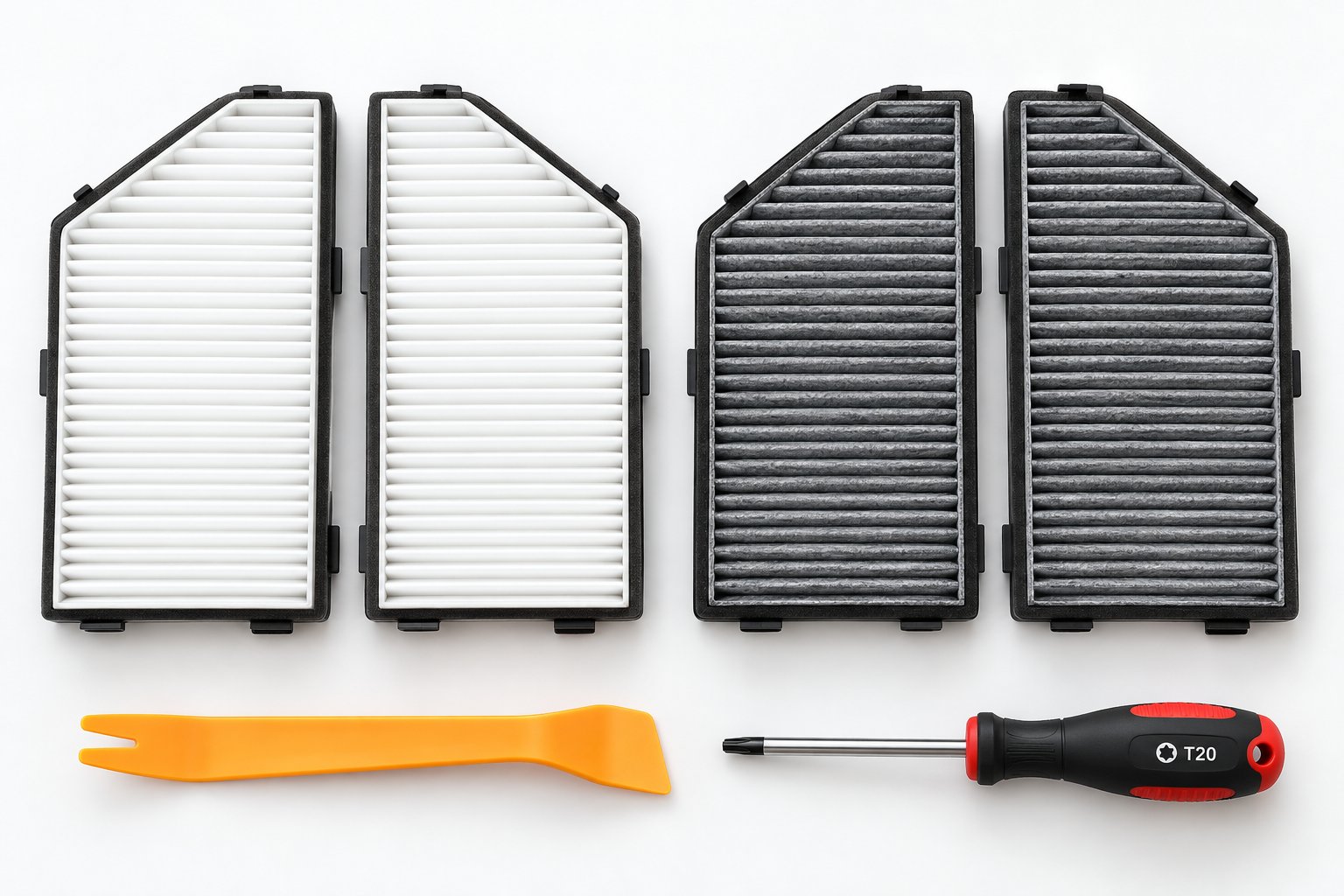
- T20 Torx screwdriver or bit — The cabin filter housing cover on many pre-refresh Model 3 builds is secured with a T20 screw. Some vehicles use a T20/6mm hybrid fastener instead. If your build has squeeze-to-release locking tabs (common on later production runs), you can skip this tool, but it's wise to have one on hand just in case. A basic Torx bit set covers you here.
- Plastic trim removal tool — This flat, wedge-shaped pry tool lets you pop push clips and release panels without scratching or cracking the interior trim. If you don't have one, a thin flathead screwdriver wrapped in painter's tape works in a pinch, though a dedicated trim tool costs just a few dollars and saves worry about scuffing soft-touch surfaces.
- Clean microfiber cloth — Useful for wiping down the inside of the filter housing and catching any loose debris that falls during removal. A damp microfiber also cleans dust off nearby vent surfaces while everything is accessible.
- Small vacuum or compressed air canister (optional but recommended) — Before sliding new filters into the housing, you'll want to clear out any accumulated dust, leaves, or particulate matter sitting inside. A handheld vacuum or a short blast of compressed air handles this in seconds and ensures the fresh filters start with a clean environment — similar in principle to how a sand filtration septic system works best when the media bed is free of excess buildup.
That's genuinely it. No jack stands, no specialty sockets, no diagnostic software. If you've ever organized data in a spreadsheet — say, learning how to add filter in Excel to sort a column — you already have the patience and precision this job demands. It's that approachable.
Choosing Your Replacement Filters
Picking the right filters matters more than picking the fanciest brand. Replacement cabin air filters for the Model 3 fall into two main categories:
Standard particulate filters capture dust, pollen, and larger airborne particles. They're effective for basic air cleaning and tend to cost less. If you drive primarily in clean, rural areas and don't deal with heavy traffic exhaust or strong odors, a standard particulate filter handles the job well — much like a basic filter Excel function that screens data by one straightforward criterion.
Activated carbon filters do everything a particulate filter does, then add an adsorption layer of activated carbon that traps volatile organic compounds, exhaust fumes, and stubborn smells. For urban commuters, allergy sufferers, or anyone who simply wants the freshest possible cabin air, activated carbon is the upgrade worth considering. The carbon layer works similarly to how a UV water filter adds a secondary purification stage beyond basic sediment screening — same housing, more protection.
Regardless of which type you choose, the Tesla Model 3 requires two individual filter elements that slot into the HVAC housing together — one upper, one lower. Most reputable replacement kits include both filters in a single package. Some aftermarket options also bundle an installation aid or alignment guide that helps you slide the filters into the housing at the correct angle, which is especially helpful for first-timers working in a tight space.
Always confirm filter dimensions and exact vehicle version compatibility before buying. Filter sizes can vary between model years and trim configurations — ordering the wrong size means a return trip you don't need.
Check the product listing for your specific Model 3 production year and variant. A filter designed for a pre-refresh 2020 build may not seat properly in a 2024 Highland, and vice versa. Spending 30 seconds verifying compatibility upfront prevents the frustration of a filter that's a centimeter too wide or too narrow to fit flush.
With your tools laid out and a confirmed-compatible filter set in hand, you're fully prepped. The actual removal and installation — the hands-on part — is where the real satisfaction kicks in.
Step-by-Step Cabin Air Filter Replacement Instructions
Tools gathered, compatible filters confirmed, and a dark pair of old filter elements waiting to be retired — you're ready for the hands-on work. This is the part that looks intimidating on paper but feels surprisingly simple once you're kneeling in front of the passenger footwell. The entire process — removal, cleaning, installation, and reassembly — takes most first-timers about 20 minutes. By the second time you do it, you'll have it down to under ten. Filter nice shot of confidence? Absolutely — you've earned it by prepping properly.
Follow these steps in order, and you'll have fresh cabin air flowing through your vents before your lunch break is over.
Removing the Access Panel and Old Filters
The removal phase involves three layers: the footwell cover, the center console side panel, and the filter housing cover itself. Each layer uses a different attachment method, so pay attention to what you're releasing at each stage. Here's the exact sequence, drawn directly from Tesla's official DIY procedure:
- Turn off the climate control system. Tap the climate icon on your touchscreen and power it down completely. You don't want the blower motor running while you have the filter housing open — it'll push debris into the cabin and make the job messier than it needs to be.
- Move the front passenger seat fully rearward and remove the floor mat. This creates the kneeling space you'll need to work comfortably beneath the dash. Slide the seat all the way back using the touchscreen or manual controls, then pull the floor mat out entirely so it's not bunching under your knees.
- Release the right-hand footwell cover from the dash. This rectangular panel sits beneath the glove box area and is held by push clips. Using your plastic trim removal tool, gently pry the panel toward you, working from one edge to release the clips sequentially. Avoid yanking sharply — steady, even outward pressure is your friend here. Once the panel loosens, don't pull it away entirely. Two electrical connectors attach to components mounted in this cover.
- Disconnect the two electrical connectors. One powers a footwell light — press down on its small tab while pulling the connector apart. The other connects to a speaker — angle the vehicle-side connector so the small retention tab clears its slot, then separate. Pull from the plastic connector housings, never the wires themselves, to avoid damage. With both connectors free, set the footwell cover aside.
- Remove the right-side center console panel. Working from top to bottom, use your trim tool to carefully release this narrow panel from the center console. It pops free from locator slots at the front and rear. Set it somewhere safe where it won't get stepped on.
-
Identify and remove the cabin filter housing cover. You'll now see a rectangular cover on the HVAC module. Here's where model-year differences matter:
- Screw-type cover: Remove the T20 Torx screw (or T20/6mm hybrid fastener) securing the cover. On heat pump models, the screw sits at the bottom of the cover; on older PTC heater models, it may be at the top.
- Tab-type cover: Use your index finger and thumb to squeeze the two locking tabs at the bottom of the cover, then tilt the cover outward to remove.
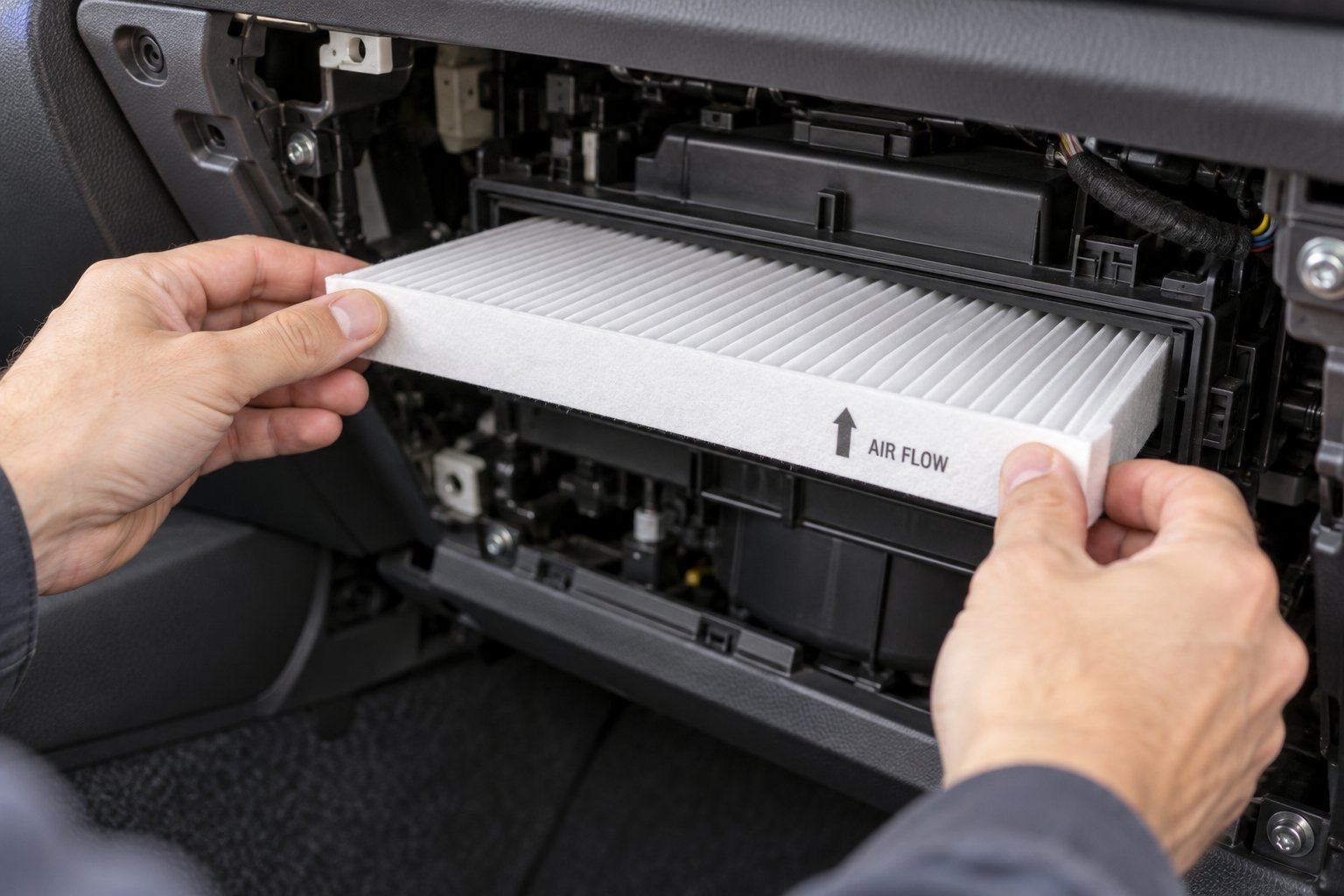
- Slide both old filter elements out, noting their orientation. Each filter has a small pull tab. Fold the upper filter's tab upward and the lower filter's tab downward for clearance. Pull the upper filter out first, then raise the lower filter up and out of the housing. Both filters will have airflow direction arrows printed on their frames — these arrows should point toward the rear of the vehicle. Pay close attention to this orientation before you remove them.
Take a photo of the old filter orientation before removal so you have a visual reference when installing the new ones. A five-second snapshot on your phone eliminates any guesswork about which direction the arrows should face during reinstallation.
With the old filters out, take a moment to inspect them. You'll likely see a stark contrast between the intake side (dark, matted with debris) and the output side (relatively cleaner). That visual difference represents everything the filter caught — and everything your lungs didn't have to deal with. Much like running a wix filter search to find the right part number for a specific vehicle, this visual check confirms you're addressing the right maintenance need at the right time.
Installing the New Filters and Reassembling
The installation sequence mirrors the removal in reverse, but a few details deserve extra attention to make sure everything seats properly and your HVAC system performs at its best. Continue with the numbered steps:
- Clean the filter housing before inserting new filters. Use a small vacuum with a crevice attachment or a few short bursts of compressed air to clear loose debris — dust, leaf fragments, and the occasional mystery particle — from inside the housing. A clean microfiber cloth handles any residue clinging to the housing walls. This step takes 30 seconds and ensures your fresh filters aren't sitting on top of old contaminants, the same way you'd clear a data set before applying a filter excel formula to get accurate results.
- Check the airflow direction arrow on each new filter. Every replacement filter — whether it's a K and N air filter style performance option or a standard activated carbon set — has an arrow printed on the frame indicating the correct airflow direction. On the Tesla Model 3, these arrows must point toward the rear of the vehicle. Compare with the photo you took in the previous step if you need reassurance.
- Insert the lower filter first. Slide the lower filter element into the housing and lower it into its seated position. It should drop in flush without force. If it resists, double-check the orientation and make sure you're not inserting it at an angle.
- Insert the upper filter above the lower one. Slide the upper filter into position directly on top of the lower element. Once both are seated, fold the pull tabs inward so they sit flat and won't interfere with the housing cover.
-
Reinstall the cabin filter housing cover.
- Screw-type cover: Engage the lower cover tab first, then install the T20 screw. Tesla specifies a torque of 1.2 Nm (0.89 ft-lbs) — snug but not gorilla-tight. If you're using a basic screwdriver rather than a torque driver, aim for firm finger-tight plus a quarter turn.
- Tab-type cover: Maneuver the top notch of the cover into its slot on the HVAC module, then press the bottom tabs until they click securely into place.
- Reattach the right-side center console panel. Align the panel with the front and rear locator slots on the center console, then apply firm, even pressure until all clips are fully secure. You should feel — and sometimes hear — each clip engage.
- Reconnect the electrical connectors and reinstall the footwell cover. Plug the light and speaker connectors back into their respective sockets, ensuring each clicks into its retention tab. Then position the footwell cover against the dash and press firmly to reseat all push clips. Work across the panel systematically so every clip engages evenly.
- Reinstall the floor mat, reposition the passenger seat, and test. Drop the floor mat back into place, slide the passenger seat forward to your preferred position, and fire up the climate system. Run the fan at multiple speeds — low, medium, and high — to verify smooth, strong airflow from every vent. You should notice cleaner-smelling air almost immediately, especially if you installed activated carbon filters.
One final step that many guides overlook: reset the cabin air filter health score on your touchscreen. If your Model 3 runs software version 2024.14 or newer, the vehicle tracks filter condition digitally. Navigate to Controls > Software to check your version, then access Service Mode and follow the reset path under the Thermal menu. Tesla's service manual details the exact touchscreen steps for both PTC heater and heat pump variants. Resetting the score ensures your maintenance tracking stays accurate for the next replacement cycle.
That's it — 15 steps, no specialty equipment, and a cabin that breathes like new. If you've ever spent time learning how to filter on Excel to organize a messy spreadsheet, you already appreciate the satisfaction of taking something cluttered and making it clean and functional. This job delivers exactly that feeling, except the payoff is fresher air on every drive. Even seasoned DIYers in the home water filter systems community will tell you: the simplest maintenance tasks are the ones that matter most when done consistently.
Of course, even straightforward jobs can hit a snag if a clip doesn't cooperate or a filter seats at an odd angle. Knowing the most common pitfalls — and how to handle them calmly — keeps a quick swap from turning into a frustrating afternoon.
Common Mistakes and Troubleshooting Tips
A snapped clip, a backwards filter, a mysterious whistle from behind the dash — these are the hiccups that turn a confident first-timer into a frustrated one. The good news? Every common mistake during a Tesla Model 3 cabin air filter replacement is both predictable and fixable. Knowing what can go wrong ahead of time is like having a cheat sheet for the exam: you won't panic because you already have the answer.
Mistakes That Can Damage Clips or Panels
The number one culprit is brute force. Those push clips and trim panels are made of molded plastic — durable under normal conditions, but surprisingly brittle when stressed the wrong way. If you're working in cold weather (garage temperatures below 40°F or so), the plastic stiffens and becomes even more prone to cracking. Imagine trying to bend a cold glass water filter pitcher lid too far — it's going to snap instead of flex.
The correct technique is simple: position your trim removal tool at the panel's edge, not the center. Apply steady, even outward pressure — pulling straight toward you — rather than twisting or levering. Work sequentially from one clip to the next along the edge, letting each release before moving on. Resist the temptation to grab the panel and yank once you feel the first clip pop free. That sudden force transfers straight to the remaining clips and can shear them clean off.
If a clip does break, don't stress. Replacement push clips for the Model 3 interior are inexpensive and widely available — a pack of spares costs a few dollars and is worth keeping in your glove box. The footwell cover and center console panel will still hold in place even with one missing clip, so a broken fastener doesn't derail the job. Order replacements and press them in later.
The second most common mistake is inserting the new filters with the airflow direction arrow pointing the wrong way. As FRAM's cabin air filter guide explains, the filter media is layered to catch larger particles first and finer particles second — a sequential trapping process that only works in one direction. Install a filter backwards and you compromise filtration efficiency, potentially allowing unfiltered air to bypass the media entirely. On the Model 3, the arrows on both filter elements must point toward the rear of the vehicle. If you took that phone photo during removal (as recommended in the previous section), a quick glance confirms the correct orientation in seconds. Much like how an excel filter formula only returns accurate results when you set the criteria correctly, a cabin air filter only performs its job when oriented as designed.
One more subtle mistake: forgetting to fold the filter pull tabs inward before reinstalling the housing cover. Those protruding tabs can prevent the cover from seating flush, which leads directly to the next set of issues.
Troubleshooting After Installation
You've buttoned everything back up, turned on the HVAC system, and something feels off. Here's what to check — and what each symptom usually means.
Restricted airflow right after installing new filters almost always points to a seating problem. One or both filter elements may be buckled, overlapping, or not pushed fully into the housing. Pop the housing cover back off and visually confirm that each filter lies flat and flush against its seat. A filter that's even slightly cocked to one side can block a surprising amount of airflow. This is an easy fix: reseat, close up, and test again.
A whistling or rattling noise coming from behind the dash usually means the housing cover isn't fully latched. If your Model 3 uses the screw-type cover, make sure the T20 fastener is snug (1.2 Nm, as Tesla specifies). If your build uses the squeeze-tab cover, press firmly at the bottom until both tabs click. A slight misalignment of a filter element can also create a gap that causes air to vibrate as it passes — pulling and reinserting the filters typically resolves this. Think of it like the rattle you'd hear from a loose roomba filter replacement that isn't clicked into its housing properly — the fix is the same: ensure a secure, gap-free fit.
A persistent musty smell even after installing brand-new filters is the trickiest scenario. If the odor lingers for more than a day or two of regular HVAC use, the problem likely isn't the filters at all. Mold or mildew may have colonized the evaporator coil, which sits upstream of the filter housing inside the HVAC module. No cabin air filter — no matter how fresh — can mask an odor source that lives deeper in the system. This requires a separate HVAC evaporator cleaning procedure, typically involving an antimicrobial spray applied through the drain port or air intake. If you're not comfortable with that process, a Tesla service appointment is the straightforward path. It's a similar principle to installing a new hot water filter on a supply line only to discover the smell is coming from sediment in the tank itself — replacing the downstream component doesn't fix an upstream contamination issue.
For quick reference, here's a troubleshooting checklist you can bookmark:
- Reduced airflow after installation — Likely cause: filter not seated flush or buckled inside the housing. Fix: reopen the housing cover and reseat both elements until they lie flat.
- Whistling or rattling from the dash — Likely cause: housing cover not fully latched, or a filter element slightly misaligned creating a gap. Fix: confirm the T20 screw or locking tabs are fully engaged; reseat filters if needed.
- Persistent musty odor despite new filters — Likely cause: mold or mildew on the evaporator coil upstream of the filter. Fix: perform an HVAC evaporator cleaning or schedule Tesla service.
- Footwell cover feels loose after reassembly — Likely cause: one or more push clips broke during removal or didn't re-engage. Fix: press the panel firmly at each clip location; replace any broken clips with inexpensive spares.
Every item on that list has a straightforward resolution. None of them require special diagnostic equipment, and none of them mean you did anything fundamentally wrong — they're simply the minor adjustments that come with any hands-on task. Even experienced DIYers who swap a 20x22x1 air filter in their home HVAC system on autopilot still double-check the fit after installation. It's good practice, not a sign of inexperience.
With potential pitfalls accounted for, the practical question shifts to a different kind of decision: which replacement filter should you actually buy? OEM, aftermarket, activated carbon, standard particulate — the options vary in price, filtration capability, and what's included in the box. A clear comparison makes that choice considerably easier.
OEM vs. Aftermarket Cabin Air Filter Comparison
Choosing a cabin air filter feels a lot like choosing any other replacement part for your vehicle — there's the factory option, and then there's everything else. Unlike a diesel fuel filter replacement where you're often locked into a narrow set of OEM-spec parts, the Tesla Model 3 cabin air filter market offers genuine variety. That variety is great for your wallet, but it also means you need to know what separates a worthwhile upgrade from a bargain-bin letdown.
What to Look for in a Replacement Cabin Air Filter
Before comparing specific brands, it helps to understand the attributes that actually matter. Think of this like learning how to add a filter in Excel to a large data set — you need to know which columns are worth sorting by before the results mean anything.
Here are the key comparison factors:
- Filter media type — Standard particulate filters capture dust, pollen, and larger debris. Activated carbon filters add a layer that adsorbs VOCs, exhaust fumes, and odors. For most urban and suburban drivers, activated carbon is the more complete option.
- Filtration rating — Higher-rated media traps finer particles. Premium aftermarket filters sometimes approach or match HEPA-level efficiency, while basic options handle only coarser contaminants.
- Package contents — The Model 3 requires two filter elements. Any reputable product ships both in a single package, but always verify. Some listings sell individual filters, which means you'd need to buy two.
- Installation aid — A handful of aftermarket brands include a guide clip or alignment tool that helps you angle the filters into the tight HVAC housing. It's a small touch that makes a real difference for first-timers.
- Price range — Prices vary from budget particulate sets under $15 to premium activated carbon kits in the $25–$45 range. OEM filters from Tesla typically sit at the higher end. As Filterbuy's OEM vs. aftermarket analysis points out, "aftermarket" doesn't automatically mean low quality — many third-party brands specialize entirely in air filtration and build filters that meet or exceed factory standards.
Activated carbon filters deserve special attention if you commute through heavy traffic or live in an area with seasonal wildfire smoke. The carbon layer works by adsorbing gas-phase pollutants that a standard particulate filter simply can't catch — similar in concept to how a water filter that eliminates fluoride uses activated media to target a specific contaminant that mechanical filtration alone misses. For drivers who primarily park in a clean suburban garage and rarely sit in congestion, a standard particulate filter does the job at a lower cost. Know your environment, and pick accordingly.
OEM vs. Aftermarket Options at a Glance
The table below lays out the main categories side by side. Use it as a quick-reference filter formula excel users would appreciate — structured data that lets you sort through the noise and focus on what fits your priorities.
| Brand / Option | Filter Type | Package Contents | Key Feature | Approximate Price Range |
|---|---|---|---|---|
| CUTIM Activated Carbon Air Filter (Model Y / Model 3) | Activated carbon | 2 filters + installation aid | Bundled alignment guide simplifies first-time installation; carbon media targets odors and VOCs | Check product page for current pricing |
| Tesla OEM Cabin Air Filter | Standard particulate (some versions activated carbon) | 2 filters | Guaranteed factory fitment; available through Tesla Shop | $$–$$$ |
| Aftermarket Particulate-Only (various brands) | Standard particulate | Typically 2 filters | Lowest cost option; adequate for clean-air environments | $–$$ |
| Premium Aftermarket Activated Carbon (various brands) | Activated carbon | Typically 2 filters; installation aid varies | Enhanced odor and VOC adsorption; brand-dependent filtration ratings | $$–$$$ |
A few notes on reading this table. The CUTIM option lands in the first row because its two-filter package with an included installation aid directly addresses the two things buyers ask about most: "Does it come with both filters?" and "Is it easy to install?" The activated carbon construction adds odor and VOC protection that a basic particulate set won't deliver. That said, check the product page for exact filter dimensions and vehicle compatibility before purchasing — a parts price is not an installed-service quote, and filter sizing can vary between pre-refresh and Highland builds.
Tesla's OEM filter is the safe, no-research-required pick. You're paying a premium for guaranteed compatibility and the peace of mind that comes with a factory part. For owners who just want to order and install without comparing specs, it's a perfectly valid choice — much like how some drivers handle an acdelco pf63 oil filter swap on a GM vehicle by sticking with the exact factory part number every time.
Generic aftermarket particulate filters sit at the budget end of the spectrum. They'll trap dust and pollen effectively, but they lack the activated carbon layer needed to neutralize odors and chemical vapors. If you're primarily concerned about keeping visible debris out of the cabin and don't mind a less aggressive approach to gas-phase contaminants, these get the job done at the lowest price point. Just verify the fitment carefully — as the Filterbuy analysis emphasizes, a filter that's even slightly undersized allows bypass air around the edges, shooting unfiltered particulates directly into the cabin.
Pros of Going Aftermarket
- Lower cost for comparable or superior filtration media
- Wider range of options — particulate, activated carbon, and HEPA-level upgrades
- Some packages include installation aids or alignment guides not offered with OEM
- Using aftermarket parts does not void your vehicle warranty under the Magnuson-Moss Warranty Act
Cons of Going Aftermarket
- Fitment quality varies by brand — always verify exact dimensions for your Model 3 build year
- Filtration claims aren't always independently verified on budget options
- No single universal standard across all aftermarket manufacturers
Pros of Sticking with OEM
- Guaranteed exact-fit for your vehicle — no compatibility guesswork
- Consistent, predictable filtration performance
- Available directly through Tesla's online shop or service centers
Cons of Sticking with OEM
- Higher price for what may be a standard-grade particulate filter
- Fewer filtration media options (no HEPA upgrade available through Tesla's standard offering)
- No installation aid included
The right choice depends on your priorities. Drivers who value maximum cabin air purity — especially allergy sufferers, parents with young children, or anyone commuting through congested urban corridors — lean toward activated carbon aftermarket options that deliver more filtration per dollar. Owners who prefer simplicity and guaranteed compatibility without researching specs will find the OEM filter perfectly adequate.
Whichever direction you go, the physical installation process is identical. The filter doesn't care which brand name is printed on its frame — it cares about correct orientation, proper seating in the housing, and being replaced on schedule. That's why i say hey man nice shot to anyone who takes the time to compare options before buying rather than grabbing the first listing that pops up in a search. A few minutes of comparison saves both money and future headaches, just like checking a pool filter pressure gauge before assuming the pump is the problem — sometimes the answer is simpler and cheaper than you think.
The filter comparison narrows your purchasing decision, but there's another calculation worth running before you click "buy": the total cost of doing this job yourself versus handing it to Tesla's service team. That math tells a compelling story.
DIY vs. Professional Service Cost Breakdown
A filter comparison helps you pick the right product — but the bigger financial question is whether you should install it yourself or pay someone else to do it. When you run the numbers, the gap between DIY and professional service is striking enough to make even the most hands-off Tesla owner reconsider handing this task over.
DIY Replacement Cost Breakdown
The DIY approach keeps your expenses remarkably lean. Your total out-of-pocket cost is essentially the price of the replacement filters themselves — and nothing else. Whether you choose a budget particulate set or a premium activated carbon kit, filter prices for the Model 3 typically range from under $15 to around $45 depending on the brand and media type. Rather than quoting a specific dollar figure that could shift with market conditions, check the product page for whatever filter you've chosen (such as CUTIM's listing or Tesla's own shop) to see the current parts price. Remember: a parts price is not an installed-service quote — it's simply the cost of the filters in the box.
What about tools? Most Model 3 owners already have the basics: a T20 Torx bit, a plastic trim tool, and a microfiber cloth. Even if you're starting from scratch, a Torx bit set and a trim removal tool together run under $15 — and they're one-time purchases you'll reuse on future swaps. A can of compressed air is optional but costs a few dollars at most. The total first-time investment, including tools, rarely exceeds the cost of the filters plus a modest toolkit addition. Every subsequent replacement drops to just the filter cost alone.
That simplicity is part of what makes this job so appealing. You don't need a lift, a scan tool, or specialized training. It's closer to swapping a bosch refrigerator filter in your kitchen than performing an actual automotive repair — a quick twist-and-slide operation that anyone with basic hand coordination can handle.
Tesla Service Center and Mobile Service Pricing
Choosing to have Tesla handle the replacement adds labor charges on top of the parts cost. Industry estimates place the total for a professional cabin air filter replacement — parts and labor combined — in the range of $150 to $200 at a Tesla service center. Some owners report slightly lower quotes through Tesla's mobile service option, where a technician drives to your location and performs the work in your driveway or parking garage, but the convenience fee still pushes the total well above what the filters alone cost.
Labor rates vary by region, too. A service center in San Francisco or New York will typically charge more per hour than one in a smaller metro area. If you're curious about the exact cost in your zip code, the Tesla app lets you request a service quote specific to your location — it's worth checking before assuming a national average applies to you.
Here's the real question: is that labor charge buying you anything you can't replicate at home? For a cabin air filter swap — a 15- to 30-minute job with no diagnostic complexity — the answer is almost always no. The convenience of professional service makes sense for repairs involving high-voltage components, suspension calibration, or software diagnostics. For pulling two filter elements out of a housing and sliding two new ones in, you're essentially paying $100+ in labor for a task simpler than most coffee filter crafts your kids tackle on a rainy afternoon. The trade-off only tilts toward professional service if your schedule genuinely can't accommodate a half-hour window, or if physical limitations make kneeling in a footwell impractical.
Where Cabin Air Filters Fit in Your Overall Maintenance Budget
Zooming out from the filter swap itself, it helps to see where this expense sits within the broader Tesla Model 3 maintenance picture. Tesla's own cost breakdown estimates annual maintenance for the Model 3 at roughly $257 to $499, depending on driving habits and regional pricing. That figure covers everything — tires, brakes, fluids, filters, and wipers. Compared to the thousands many ICE vehicle owners spend annually on oil changes, transmission service, and exhaust system repairs, the Model 3's maintenance bill is refreshingly short.
The recurring maintenance items you'll actually encounter break down like this:
- Tire rotation — Every 6,250 miles or as needed based on tread wear differential.
- Cabin air filter replacement — Every 2 years, per Tesla's recommendation.
- HEPA filter replacement (if equipped) — Every 3 years.
- Brake fluid testing — Every 4 years; replace as needed based on moisture contamination levels.
- Brake caliper cleaning and lubrication — Annually or every 12,500 miles in regions with salted winter roads.
- Wiper blade replacement — As needed, typically once a year depending on climate exposure.
Notice something? The cabin air filter is one of the only items on that list you can fully handle at home with no special equipment. Tire rotations require a jack and torque wrench (or a shop visit). Brake fluid testing calls for a moisture meter or professional evaluation. Wiper blades are straightforward but infrequent. The cabin air filter, by contrast, lands in the sweet spot of regular enough to matter and easy enough to own entirely.
Think of it like managing a personal budget in a spreadsheet — applying an excel filter to sort expenses by category reveals which line items you can control. The cabin air filter is squarely in the "controllable" column. Every time you handle it yourself, you're pocketing the labor differential and reinforcing a habit of proactive vehicle care that extends to everything else on the list. Even a band reject filter in signal processing works by eliminating a specific unwanted frequency — and in your maintenance budget, the unwanted frequency is unnecessary labor cost on a job this simple.
The financial case is clear: DIY cabin air filter replacement is one of the highest-return, lowest-effort maintenance tasks a Model 3 owner can perform. The savings compound over years of ownership, the skill transfers to every future replacement, and the time investment is genuinely minimal. What matters most, though, is turning that knowledge into a consistent habit — building a simple maintenance rhythm that keeps your Model 3 running at its best without ever overpaying for routine care.
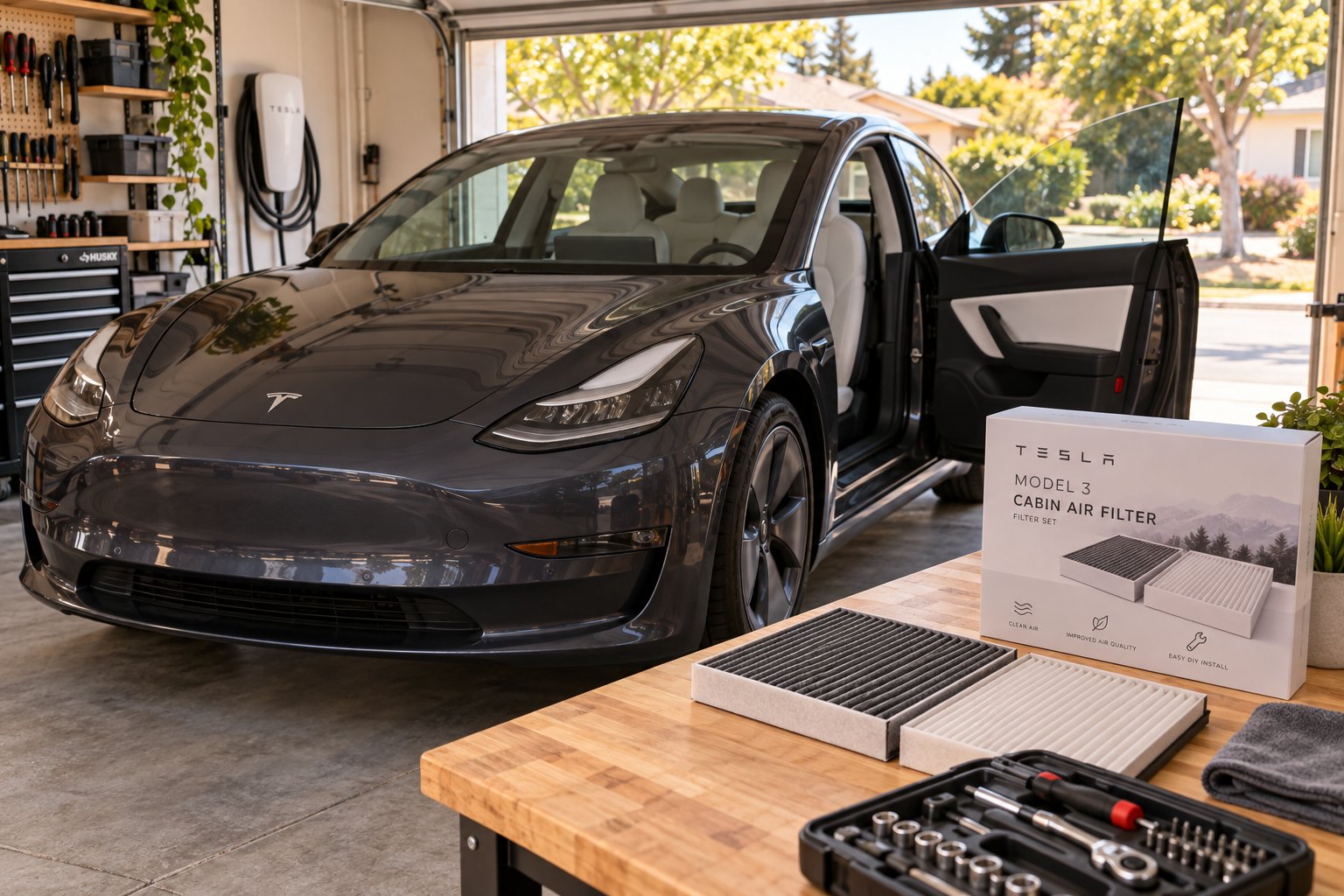
Integrating Filter Replacement Into Your Tesla Maintenance Routine
Saving money on a single filter swap feels good. Turning that swap into a repeatable habit that keeps your entire Model 3 in peak condition? That's where the real ownership payoff lives. The cabin air filter is your gateway maintenance task — the one that proves you can handle routine upkeep without a service appointment, a waiting room, or an inflated labor bill. Every other recurring task on the Model 3's short maintenance list follows the same logic: know what's due, gather the right parts, and block out a small window to get it done.
Building a Simple Tesla Maintenance Calendar
A personal maintenance calendar doesn't need to be complicated. A recurring reminder in your phone's calendar app or a simple note pinned to your digital dashboard works perfectly. The goal is visibility — if you can see what's coming, you won't miss it. Premium Autos recommends renaming one of your trip odometers (like Trip B) to track mileage-based tasks such as tire rotations, while time-based items like filter replacement and brake fluid testing get calendar alerts.
Here's how the core maintenance tasks stack up:
| Maintenance Task | General Interval | DIY Difficulty Level |
|---|---|---|
| Cabin air filter replacement | Every 2 years | Beginner — 15 to 30 minutes |
| Tire rotation | Every 6,250 miles | Intermediate — requires jack and torque wrench |
| Brake fluid testing | Every 4 years | Intermediate — moisture meter or professional evaluation |
| Wiper blade replacement | As needed (typically annually) | Beginner — under 5 minutes |
| Brake caliper cleaning/lubrication | Annually or every 12,500 miles (cold climates) | Intermediate to advanced |
The cabin air filter sits at the top of that table for a reason — it's the easiest entry point for any owner who's never turned a wrench on their own vehicle. Once you've done it once, tire rotations and wiper swaps feel like natural next steps. You build mechanical confidence the same way you build any skill: start with the simplest version and scale up. It's similar to how pool owners learn basic equipment care before tackling bigger projects — figuring out how often change sand in pool filter media or backwash a system comes after mastering the straightforward stuff first.
Recording each completed task matters, too. Tesla's Maintenance Summary feature (accessible via Controls > Service > Maintenance on your touchscreen) lets you log service dates and mileage so the vehicle tracks your history digitally. As the Tesla owner's manual notes, it's the owner's responsibility to keep these entries accurate — especially for DIY work that Tesla's system won't automatically detect. A clean maintenance record protects your warranty and strengthens resale value down the road.
Your Next Step — Gather Parts and Get Started
You've read the symptoms, studied the steps, compared the options, and run the cost math. The only thing standing between you and fresher cabin air is clicking "order" on the right set of filters. Before you do, take 30 seconds to confirm two things: your Model 3's exact production year (check Controls > Software on the touchscreen or decode your VIN) and whether your build is a pre-refresh, refresh, or Highland variant. That quick verification ensures the filters you buy will seat perfectly in your specific HVAC housing.
For owners who want activated carbon filtration — the upgrade that tackles odors and VOCs alongside dust and pollen — CUTIM's Activated Carbon Air Filter for Tesla Model Y / Model 3 ships as a two-filter package with an included installation aid, which is especially helpful if this is your first time navigating the tight housing behind the dash. Check the product page for exact filter dimensions, current pricing, and vehicle compatibility before purchasing. Keep in mind that a parts price is not an installed-service quote — it's simply the cost of the filters themselves, and the installation is the lunch-break project you've just learned to handle on your own.
Every well-maintained air cleaner filtration system — whether it's in a commercial building, an oil furnace filter stack, or the HVAC module behind your Model 3's dash — performs best when serviced on a predictable schedule. The difference with your Tesla is that you control the schedule, the parts, and the process. No appointment queue, no markup on labor, no waiting room magazines from 2019.
Nice shot, hey man — you just added a genuine, money-saving maintenance skill to your ownership toolkit. The cabin air filter may be one of the smallest components in your Model 3, but replacing it yourself represents something bigger: the confidence to take ownership of your vehicle's care, one straightforward task at a time. Block that two-year reminder, clean your K&N air filter or swap in a fresh activated carbon set when the time comes, and enjoy every breath of cleaner air on the road ahead.
Tesla Model 3 Cabin Air Filter Replacement FAQs
1. How often should I replace the cabin air filter in my Tesla Model 3?
Tesla officially recommends replacing the cabin air filter every two years. However, your driving environment plays a significant role. If you regularly commute through heavy traffic, live in a dusty or high-pollen region, or frequently drive through areas with poor air quality such as wildfire zones, you may need to replace it sooner. A quick visual inspection once a year helps you gauge whether the filter media is clogged or still has life left. A clean filter appears uniformly gray-white, while a spent one looks noticeably dark and matted with debris.
2. What tools do I need to replace the Tesla Model 3 cabin air filter myself?
You need very few tools: a T20 Torx screwdriver or bit (for pre-refresh models with screw-type housing covers), a plastic trim removal tool to safely release dash panel clips without scratching, and a clean microfiber cloth. A small handheld vacuum or compressed air canister is optional but recommended for clearing debris from the filter housing before installing new elements. Most Tesla owners already have these items at home, and even purchasing them new costs under $15 total.
3. What is the difference between the cabin air filter and the HEPA filter on a Tesla Model 3?
These are entirely separate components. The standard cabin air filter consists of two stacked elements located behind the lower dash panel on the passenger side — every Model 3 has them. The HEPA filter assembly, part of Tesla's Bioweapon Defense Mode system, is a larger single unit housed in the front trunk area and is only present on certain configurations. They require different replacement parts, have different access points, and follow different service procedures. Always confirm which filter you are servicing before ordering parts.
4. How much does it cost to replace a Tesla Model 3 cabin air filter — DIY vs. professional service?
DIY replacement costs only the price of the filter set itself, which typically ranges from under $15 for basic particulate filters to around $45 for premium activated carbon options. Professional replacement through a Tesla service center or mobile service generally runs between $150 and $200 including parts and labor. The labor premium covers a job that takes most first-timers about 20 minutes at home, making DIY one of the highest-return maintenance savings available to Model 3 owners.
5. Should I choose an activated carbon cabin air filter or a standard particulate filter for my Model 3?
It depends on your driving conditions. Standard particulate filters effectively capture dust, pollen, and larger airborne debris at a lower price point, making them suitable for drivers in clean, rural environments. Activated carbon filters add an adsorption layer that neutralizes volatile organic compounds, exhaust fumes, and stubborn odors — a meaningful upgrade for urban commuters, allergy sufferers, or anyone regularly driving through heavy traffic or wildfire smoke. Options like CUTIM's Activated Carbon Air Filter for Model Y/Model 3 ship as a two-filter package with an installation aid, which can simplify the process for first-time DIYers. Always verify exact filter dimensions and vehicle compatibility on the product page before purchasing.