
What Tesla Model 3 Wireless Phone Charging Actually Delivers
Does the Tesla Model 3 come with wireless phone charging? The short answer: it depends on when your car was built. Tesla's approach to in-cabin wireless charging has shifted multiple times since the Model 3 first rolled off the production line in 2017, and that evolution has created genuine confusion for current owners and anyone shopping for a used or new Model 3 today.
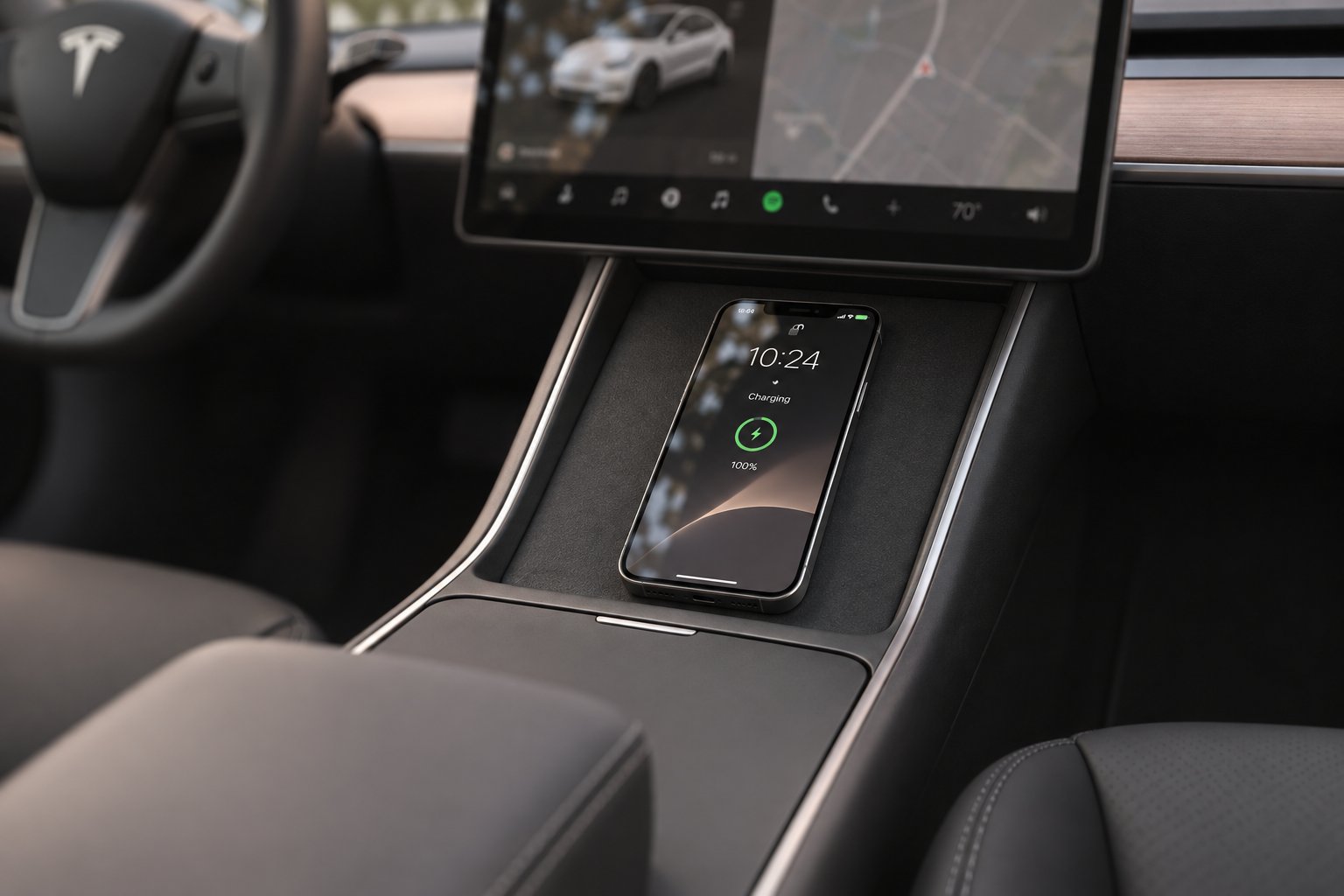
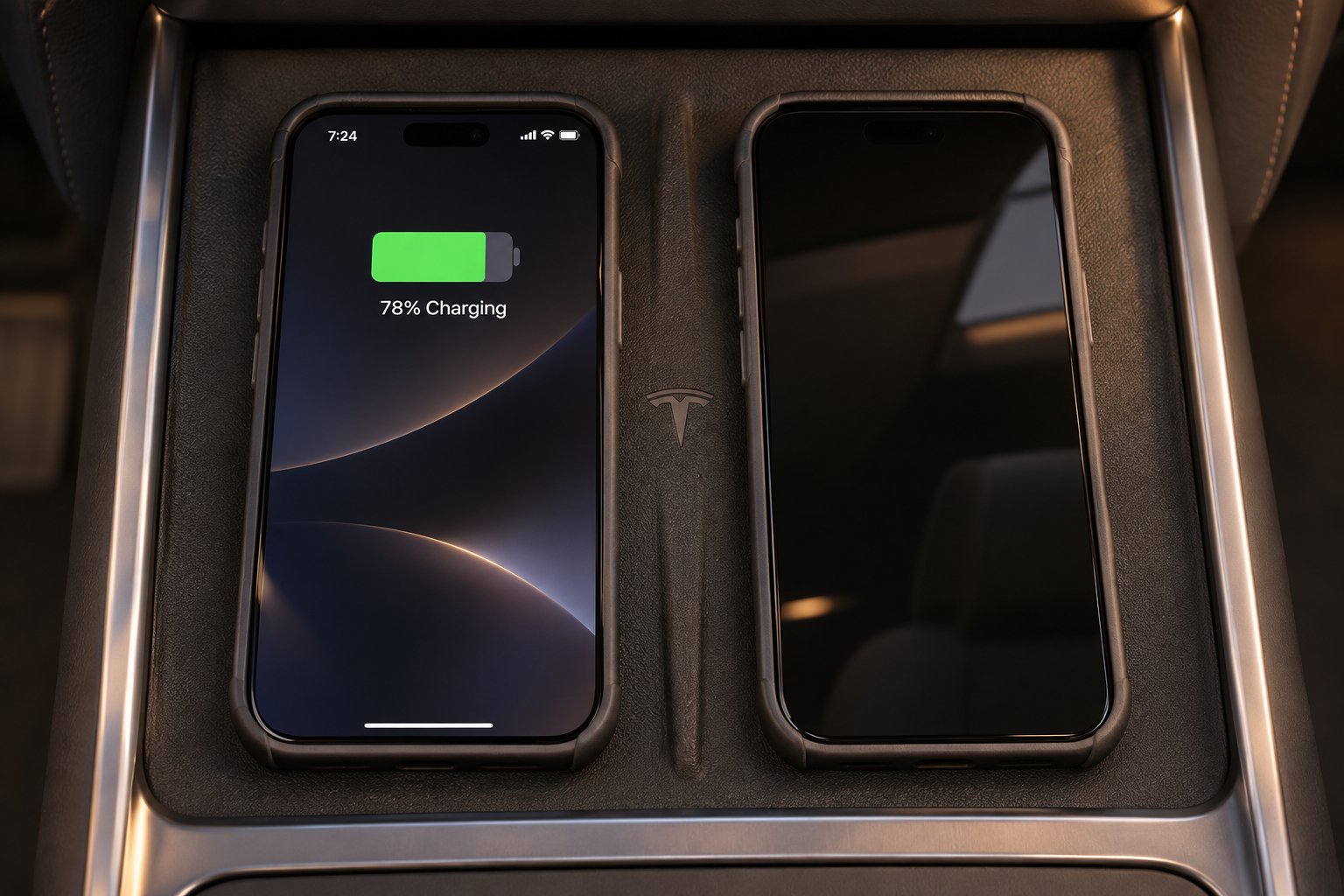
In the Tesla context, wireless phone charging means a Qi-compatible pad built into the center console. You place your smartphone on the pad — no cables, no plugging in — and the phone begins charging automatically. Tesla designed the system, as described on its official product page, to handle two phones simultaneously on a non-slip silicone surface that sits right below the main touchscreen. It is a clean, cable-free solution that fits the minimalist interior Tesla is known for.
Whether your Model 3 includes a factory wireless charging pad depends entirely on the production year and generation — not the trim level alone. Early production vehicles shipped without one, while later builds added it as standard equipment.
That single detail — production timing — is the source of nearly all the mixed information floating around forums, YouTube reviews, and owner groups. And this guide breaks down every generation, every phone, and every edge case so you never have to wonder again.
What Wireless Charging Looks Like Inside a Model 3
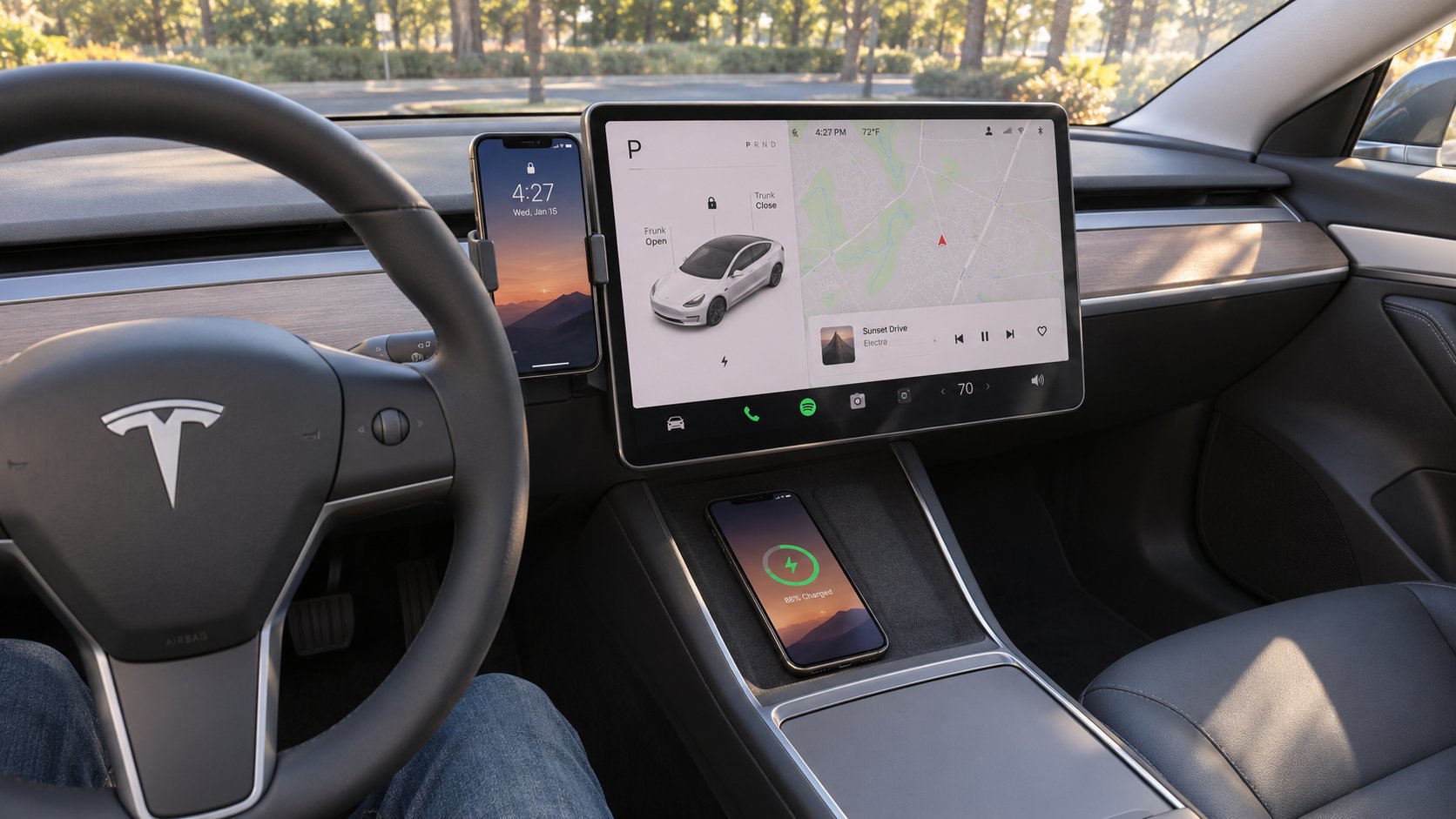
Imagine sliding into the driver's seat and dropping your phone onto a flat, recessed tray just ahead of the center console armrest. That tray sits directly beneath the 15-inch touchscreen, positioned so either the driver or front passenger can place a device without fumbling. The pad itself holds two phones side by side, each resting on its own dedicated charging zone. The non-slip surface keeps devices from sliding around during turns or hard braking, and because the tray is recessed rather than raised, your phone stays out of the way visually while still being easy to grab when you need it.
There are no indicator lights on the pad itself. You'll notice the charging status on your phone's screen — a battery icon or notification confirming that power is flowing wirelessly. It is a subtle, integrated experience that matches the rest of the Model 3's minimalist cabin design.
Why So Much Confusion Exists Among Owners
Tesla has a well-documented habit of updating hardware mid-production run without issuing public announcements. The wireless charger is a perfect example. As Electrek reported, Tesla quietly added a factory Qi wireless charger and USB-C ports to US-made Model 3 vehicles in mid-2020 — features that had already appeared in the Model Y and Chinese-built Model 3 units. Before that update, every Model 3 owner who wanted wireless charging had to buy a separate Tesla phone charger or a third-party aftermarket pad.
To make things even murkier, Tesla's own service documentation distinguishes between different hardware revisions of the wireless charger module based on vehicle build date — clip-secured versus screw-secured phone docks, for instance. These internal changes never appear on a window sticker or in a buyer's guide. Layer in the dozens of aftermarket mobile charger 3 in 1 options and drop-in Qi pads marketed to Tesla owners, and you have a landscape where even experienced EV enthusiasts struggle to know exactly what their car supports.
The generation-by-generation breakdown that follows cuts through all of that noise, mapping every Model 3 production era to its factory charging hardware — and pointing out exactly where aftermarket solutions fill the gaps.
Which Model 3 Generations Include a Factory Charging Pad
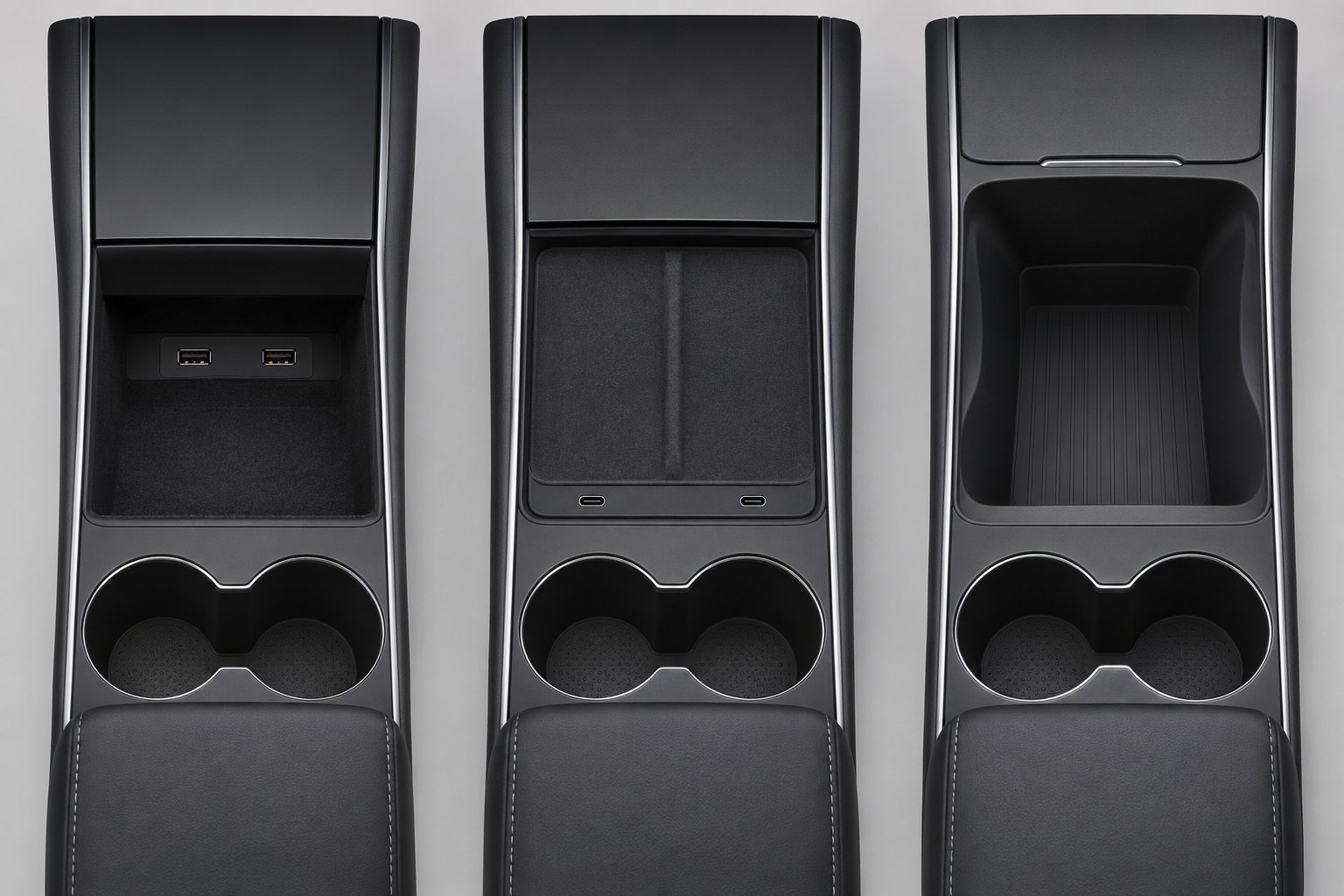
Not every Model 3 left the factory with the same equipment under the center console. Tesla has produced three distinct hardware eras of the Model 3, each with a different answer to the wireless charging question. Knowing which era your car belongs to is the fastest way to figure out whether you already have a factory pad — or whether you need to explore aftermarket options like a tesla wireless portable charger or drop-in Qi solution.
Original Model 3 Production Run (2017 – Mid-2020)
If you bought or are shopping for a Model 3 built between 2017 and roughly mid-2020, you will not find a factory wireless charging pad inside. These early vehicles shipped with USB-A ports and a center console tray designed for cable charging only. Tesla simply did not include wireless Qi hardware during this production window.
The good news? The center console layout in these original models accommodates aftermarket drop-in Qi pads remarkably well. Dozens of third-party options fit neatly into the existing tray space, giving owners a near-factory look without permanent modifications. Just keep in mind that wattage, build quality, and reliability vary widely across brands — a point worth researching before you buy.
Mid-Cycle Refresh Models (Mid-2020 – 2023)
In mid-2020, Tesla quietly upgraded US-made Model 3 vehicles with a built-in dual wireless charging pad and USB-C ports — a change initially spotted by tech outlets rather than announced by Tesla itself. Chinese-built Model 3s and the Model Y had already received these features, so US buyers were essentially catching up.
From this point forward, every new Model 3 included dual Qi charging zones as standard equipment. The layout supported two phones side by side, each sitting on its own charging coil beneath the non-slip console surface. MotorTrend's comparison of old and new Model 3s confirmed the dual wireless phone chargers positioned just ahead of the cupholder area, directly below the 15-inch display. For the vast majority of 2021–2023 Model 3 owners, the factory pad handles everyday charging needs without any additional purchases.
Highland Generation and Beyond (2024 – Present)
The 2024 Model 3 "Highland" redesign brought a comprehensively updated interior — and with it, a refined wireless charging module. The pad sits slightly deeper in the redesigned center console, improving phone stability during spirited driving. Under the surface, the Highland unit features two Qi-certified charging coils capable of delivering up to 15 watts of power depending on the phone and conditions — a meaningful step up from the roughly 7.5W ceiling many owners experienced with the mid-cycle pad.
Tesla also revised the physical mounting hardware partway through 2024 production. Vehicles built before March 3, 2024, use a clip-secured phone dock, while those built on or after that date use a screw-secured design. The two are not interchangeable — a detail that matters if you ever need a replacement module or encounter a tesla phone charger not working scenario that requires part swaps.
| Generation | Production Period | Factory Wireless Pad Included | Pad Design | Aftermarket Compatibility Notes |
|---|---|---|---|---|
| Original | 2017 – Mid-2020 | No | No pad; USB-A tray only | Wide range of drop-in Qi pads available; fits existing console tray with no modification |
| Mid-Cycle Refresh | Mid-2020 – 2023 | Yes | Dual Qi zones, non-slip surface, USB-C ports | Factory pad sufficient for most users; aftermarket upgrades available for higher wattage or MagSafe alignment |
| Highland | 2024 – Present | Yes | Deeper dual Qi pad, up to 15W, revised mounting (clip-secured pre-March 2024; screw-secured post-March 2024) | Aftermarket MagSafe/Qi2 upgrade kits available; confirm dock type before purchasing replacement parts |
With the hardware era identified, the next question becomes whether the pad's power output and charging standard actually match what your specific phone needs. The answer depends on how Qi wireless charging negotiates power delivery — and why not every phone charges at the same speed on the same pad.
How Qi Wireless Charging Works Inside a Tesla
Your Model 3's center console pad and your phone are having a silent conversation every time you set the device down. Understanding what they are actually saying to each other — and why that conversation sometimes breaks down — explains most of the charging quirks owners run into. It also reveals why two phones placed on the exact same pad can charge at very different speeds.
Qi Standard and Power Delivery in the Tesla Console
Qi (pronounced "chee") is the universal wireless charging standard developed by the Wireless Power Consortium. It works through electromagnetic induction: a coil inside the charging pad generates an electromagnetic field, and a matching coil inside your phone converts that field back into electrical current to fill the battery. No physical connection needed — just close proximity between the two coils.
Here is where wattage enters the picture. Tesla's mid-cycle refresh pad (2020–2023) typically delivers around 5W to 7.5W per phone, while the Highland generation pad can push up to 15W under ideal conditions. Your phone, however, has its own ceiling. Many Android flagships accept 10W to 15W wirelessly, while iPhones cap standard Qi charging at 7.5W. The pad and the phone negotiate the highest wattage both sides can handle — and the lower number always wins. So even a 15W-capable Highland pad will top out at 7.5W when charging an iPhone via standard Qi.
One critical distinction trips up a surprising number of buyers: magnetic attachment is not the same as wireless charging. Some aftermarket Tesla phone mounts use magnets to hold your device securely on a dashboard or vent clip, but they contain no charging coil whatsoever. They are passive holders. If a product does not explicitly state Qi, Qi2, or wireless charging capability, assume it only provides physical grip — not power delivery. Confusing the two is one of the most common reasons owners report a tesla wireless charger not working when, in reality, they never had a charger to begin with.
MagSafe and Qi2 Compatibility Explained
Apple introduced MagSafe with the iPhone 12 series, embedding a ring of magnets around the phone's internal charging coil. Those magnets snap the phone into perfect alignment with a MagSafe charger, enabling faster speeds — up to 25W on the latest MagSafe hardware. But MagSafe is Apple's proprietary layer built on top of the Qi standard. A MagSafe iPhone placed on a non-MagSafe Qi pad still charges; it just charges at Qi speeds (up to 7.5W) rather than MagSafe speeds, and there is no magnetic snap to lock it in place.
The newer Qi2 standard bridges that gap. Developed by the Wireless Power Consortium using Apple's magnetic alignment module, Qi2 brings the same ring-of-magnets concept to all compatible devices — Android included. Qi2 chargers support up to 15W, with the newer Qi2.2 spec reaching 25W. Android manufacturers like Samsung (Galaxy S25 and S26 series), Google (Pixel 10 series), and OnePlus (OnePlus 13) have adopted Qi2 in their flagship devices, meaning magnetic alignment is no longer an iPhone-only feature.
So where does Tesla's factory pad fit? The console charger in current Model 3 vehicles uses standard Qi — it does not include the magnetic alignment ring found in MagSafe or Qi2 chargers. Your MagSafe iPhone will charge on it, but without the magnetic snap that locks the phone into the optimal coil position. The magnets in the phone are still there; they just have nothing in the pad to grab onto. This means coil alignment depends entirely on how accurately you place the phone on the pad's surface — a detail that matters more than most owners realize.
Several technical factors determine whether your phone charges quickly, slowly, or not at all on the Tesla console pad:
- Coil alignment — Even a few millimeters of offset between the pad's coil and your phone's receiver coil can reduce efficiency dramatically. Without magnetic alignment, placement precision is up to you.
- Phone case thickness — Qi charging works across small air gaps, but thick cases, especially wallet-style or heavily armored ones, increase the distance between coils. Most pads perform reliably through cases up to about 3mm thick; beyond that, charging may become intermittent or fail entirely.
- Ambient temperature — Both your phone and the charging pad are sensitive to heat. A Tesla parked in direct sunlight can push the console surface well above the comfort zone, triggering the phone's built-in thermal protection and pausing charging until temperatures drop. Cold extremes slow chemical reactions inside the battery, reducing charge acceptance rates.
- Wattage negotiation — The pad and phone communicate to agree on a safe power level. If either side detects an issue — a foreign metal object, excessive heat, or an unrecognized device — the negotiation may default to a lower wattage or refuse to charge altogether. This handshake happens silently, which is why tesla wireless charging not working issues sometimes appear without any visible cause.
These four variables interact with each other constantly. A perfectly aligned phone in a thin case on a cool day charges noticeably faster than the same phone in an armored case on a sun-baked console. Understanding these mechanics makes it far easier to diagnose problems — and to predict how your specific phone will perform on your specific Model 3's pad.
Phone Compatibility Breakdown by Manufacturer
Coil alignment, case thickness, ambient temperature, wattage negotiation — those four variables define the physics. But what do they actually mean for your specific phone sitting on your Model 3's pad? The answer varies more than you might expect across manufacturers, and even across models within the same brand. Here is a structured look at how the most popular smartphones perform as a wireless charger for Tesla center console pads.
Apple iPhone Compatibility and MagSafe Behavior
Every iPhone from the iPhone 8 onward supports Qi wireless charging, but the real conversation starts with the iPhone 12 series. That is when Apple introduced MagSafe — a ring of magnets embedded around the internal charging coil designed to snap the phone into perfect alignment with compatible chargers. The iPhone 13, 14, 15, 16, 17, and 18 series all carry the same MagSafe magnet array, and all charge on Tesla's console pad without issue at the standard Qi rate of up to 7.5W.
Here is the nuance: those MagSafe magnets do not help you on a flat Tesla pad. The factory console charger has no magnetic counterpart, so the snap-to-align benefit disappears entirely. You are placing the phone manually and relying on visual positioning to center the coil. A MagSafe case does not hurt — the magnets are passive when there is nothing to attract — but it does not improve alignment either. Think of it as a tesla magsafe charger experience minus the "mag" part.
Case thickness becomes the deciding factor for iPhones. Tesla's own Model 3 manual advises removing thick or metal cases when charging fails. Slim TPU and silicone cases under 3mm — like standard MagSafe-compatible options — generally pass power without problems. Wallet-style cases with card slots, heavily armored rugged cases, and anything incorporating metal plates or kickstands will either block charging entirely or reduce it to a trickle. Apple's wireless charging guidance confirms that objects between the phone and charger — including thick case materials — can degrade performance.
The newer iPhone Duo (Apple's foldable) introduces a unique challenge. Its folded form factor, hinge cover, and camera surround can lift or tilt the phone on a flat surface, shifting the charging coil away from the pad's sweet spot. Owner reports suggest that bare-phone testing on the Tesla pad is especially important with the Duo, since even small geometry changes from a case or accessory can interrupt the connection.
Samsung Galaxy and Google Pixel Performance
Samsung's Galaxy S series has supported Qi wireless charging since the Galaxy S6, and recent flagships accept significantly higher wattage than iPhones. The Galaxy S24 and S25 series support up to 15W Qi charging, while the Galaxy S26 series adds Qi2 magnetic alignment. On a Highland-generation Model 3 pad capable of 15W, these phones can theoretically draw the full output — a real advantage over iPhones capped at 7.5W via standard Qi.
There is a catch, though. Samsung places its wireless charging coil slightly differently across model sizes. The Galaxy S25 Ultra's coil sits in a marginally different position than the standard S25's, which means the ideal placement spot on Tesla's pad shifts depending on which Galaxy model you own. You will notice this most with the Ultra models, whose larger bodies sometimes need a small nudge left or right to hit the charging sweet spot. Spending a few seconds adjusting position while parked — then remembering that spot — saves frustration on future drives.
Google's Pixel lineup tells a similar story. The Pixel 7 through Pixel 10 series all support Qi wireless charging, with the Pixel 9 Pro and Pixel 10 Pro accepting up to 12W–15W wirelessly from compatible pads. Pixel phones tend to have well-centered coils, making alignment on the Tesla pad relatively forgiving. Owners generally report fewer placement issues with Pixels than with larger-footprint Samsung Ultra devices.
OnePlus, Motorola, and other Android flagships with Qi support also work on the Tesla pad, but with one important caveat: some manufacturers use proprietary fast-charging protocols that only activate with their own branded chargers. OnePlus's AIRVOOC, for instance, delivers rapid wireless charging exclusively on OnePlus-certified pads. On a Tesla console, these phones fall back to standard Qi speeds — typically 5W to 10W. The phone charges, just not at the headline speed printed on the spec sheet.
Case Thickness and Alignment Tips
Regardless of phone brand, the same physical rules apply to tesla wireless charging through a case. The Qi standard works best with roughly 3mm or less of material between the charging coil and the device. Push past 5mm and charging slows dramatically or stops altogether.
A few practical guidelines make a real difference:
- Slim TPU, silicone, and polycarbonate cases — These materials are transparent to the electromagnetic field. Cases under 3mm thick from any reputable brand should charge reliably on the Tesla pad.
- Wallet and folio cases — Card slots add thickness, and metal cards (credit cards, hotel keys) sitting between the phone and pad will block charging. Remove cards or flip the wallet portion away from the pad surface before placing the phone down.
- Rugged and armored cases — Many exceed 5mm and include metal reinforcements. If your phone does not charge through the case, test it bare before assuming the pad is faulty.
- Metal plates and magnetic mounts — Aftermarket metal plates stuck to the back of a case for car mount compatibility are one of the most common invisible culprits. They sit directly over the charging coil and block power transfer almost completely.
The table below summarizes compatibility across the most common phone families on the Tesla Model 3 wireless charging pad:
| Phone Model Series | Wireless Charging Standard Supported | Known Alignment Issues on Tesla Pad | Case Recommendations |
|---|---|---|---|
| iPhone 12 / 13 / 14 / 15 / 16 / 17 / 18 | Qi (up to 7.5W); MagSafe (up to 25W on MagSafe chargers only) | Minimal with standard models; MagSafe magnets do not assist alignment on Tesla's non-magnetic pad | Slim MagSafe-compatible cases under 3mm work well; remove wallet attachments and metal plates |
| iPhone Duo (foldable) | Qi; MagSafe | Hinge, stand, and camera surround can tilt phone off coil center; case geometry adds variables | Test bare phone first; use slimmest case option; avoid cases with protruding kickstands |
| Samsung Galaxy S24 / S25 | Qi (up to 15W) | Ultra models may need slight repositioning due to larger body and offset coil placement | Standard thin cases; avoid metal-backed covers; remove S Pen accessories before placing on pad |
| Samsung Galaxy S26 | Qi2 (magnetic alignment on Qi2 chargers); Qi (on standard pads) | Similar to S25 on Tesla's non-magnetic pad; Qi2 alignment benefit unavailable on factory pad | Slim cases under 3mm; magnetic alignment cases do not assist on Tesla's Qi pad |
| Google Pixel 7 / 8 / 9 / 10 | Qi (up to 12W–15W depending on model) | Generally well-centered coils; fewer placement issues reported than Samsung Ultra models | Standard slim cases; avoid cases with integrated metal kickstands |
| OnePlus 12 / 13 | Qi (up to 10W on non-OnePlus pads); AIRVOOC (up to 50W on proprietary pads only) | No major alignment issues; falls back to standard Qi speeds on Tesla pad | Slim TPU or silicone; avoid thick sandstone or bumper cases |
Keep in mind that this table reflects general behavior patterns. Individual results can vary based on your specific Model 3 generation, software version, and environmental conditions. When in doubt, the simplest diagnostic is the one Tesla recommends: remove the case, place the bare phone on the pad, and see if charging begins. If it does, the case is likely the issue. If it does not, the problem lives somewhere else — and that is exactly what the next section on real-world charging performance helps you evaluate.
Real-World Charging Performance While You Drive
Here is the question nobody seems willing to answer directly: when you drop your phone on the Tesla Model 3 wireless phone charger and start driving, does the battery actually go up — or does it just drain more slowly? The honest answer depends almost entirely on what your phone is doing at the time. And for many drivers, the reality is less impressive than the spec sheet suggests.
Charging Speed During Navigation and Streaming
Imagine a typical weekday commute. You place your phone on the console pad, fire up Google Maps or Waze for live traffic routing, stream a Spotify playlist over Bluetooth, and maybe take a hands-free call along the way. Your phone's screen is on, the GPS radio is active, the processor is rendering map tiles in real time, and the Bluetooth connection is pushing audio data to the car's speakers. That is a lot of simultaneous work — and every bit of it drains the battery.
A phone running active GPS navigation with screen-on typically draws somewhere between 5W and 10W of power, depending on screen brightness, processor efficiency, and cellular signal strength. Layering on music streaming and a phone call pushes consumption toward the higher end of that range. Meanwhile, Tesla's mid-cycle refresh pad delivers around 5W to 7.5W, and even the Highland generation pad tops out at up to 15W for Qi-enabled phones under ideal conditions.
See the math problem? On a mid-cycle Model 3, the pad may deliver 7.5W while your phone consumes 8W or more. The result is a net battery loss — your phone is technically charging, but it is losing ground. You arrive at your destination with a lower battery percentage than when you left. Highland owners fare better thanks to the higher wattage ceiling, but even 15W can barely keep pace with a phone running full navigation, streaming, and call duties simultaneously — especially since real-world wireless charging efficiency hovers around 70-80%, meaning not all of that 15W actually reaches the battery.
For lighter use, the picture improves dramatically. A phone sitting idle with the screen off draws minimal power, and the pad can steadily add charge over the course of a drive. Light music streaming without navigation falls somewhere in between — the phone gains charge, just not quickly. The pattern is clear: the less your phone does, the more effective wireless charging becomes.
Dual-Phone Charging and Power Splitting
The Model 3's dual-pad layout raises another practical question. If you and your passenger both place phones on the console, does each device get the full wattage — or do they split a shared power budget?
Tesla designed the console with two independent charging coils, each connected to its own power circuit. Placing a second phone on the adjacent pad does not reduce the wattage available to the first phone. Both devices negotiate power independently with their respective coils. This is a meaningful design choice — some aftermarket charging pads use a single power source split between two coils, which halves the available wattage per device. The factory Tesla pad avoids that compromise.
That said, "independent" does not mean "unlimited." Each coil still delivers power within the same Qi wattage range discussed above. Two phones running navigation simultaneously will each face the same power-versus-consumption math. The dual layout doubles convenience, not speed.
For heavy phone use during drives — active GPS, streaming, and calls — wired USB-C charging still outperforms wireless charging in raw speed. A USB-C connection can deliver 18W, 27W, or higher depending on the cable and port, easily outpacing any Qi pad while keeping the phone cool.
This is not a knock against wireless charging. It is a practical reality that shapes how you should think about the feature. The console pad excels at passive, background charging — topping off your phone during errands, keeping the battery steady on a calm highway cruise, or adding a few percentage points during a short drive. It is less suited for keeping a power-hungry phone alive during an intense, multi-app commute. As Belkin's analysis of car charging in 2025 notes, wired chargers avoid the heat-related slowdowns that wireless pads face in enclosed car environments, maintain consistent power flow, and support fast-charging protocols that wireless simply cannot match.
To help you set realistic expectations, here is how different usage scenarios rank from best to worst wireless charging performance on a Tesla Model 3 pad:
- Phone idle, screen off — Best case. The pad delivers steady power with almost no competing drain. You will see noticeable battery gains even on short drives.
- Light music streaming via Bluetooth — Good performance. Modest power draw from audio playback allows the pad to add charge gradually over time.
- Active GPS navigation (screen on) — Mixed results. The screen, GPS radio, and processor create significant draw. Mid-cycle pads may barely break even; Highland pads can maintain or slowly increase battery level.
- GPS plus streaming plus phone calls — Worst case. Combined power consumption often exceeds what the pad delivers. Expect slow charging at best, or a gentle net battery loss at worst — especially on pre-Highland Model 3s.
Knowing these real-world limits helps you make a practical choice: use wireless for convenience when your phone is not working hard, and switch to a wired USB-C connection when you need guaranteed power delivery. The tesla gen 3 mobile charger pad is a convenience feature, not a performance feature — and setting that expectation correctly saves you from wondering whether something is broken when your battery barely moves during a navigation-heavy trip.
Of course, sometimes the battery does not move at all — and the problem is not usage patterns. Charging can stop unexpectedly for reasons that have nothing to do with how many apps are running, and diagnosing those failures requires a different kind of troubleshooting altogether.
Troubleshooting When Wireless Charging Stops Working
Few things are more frustrating than a tesla model 3 phone charger that worked perfectly yesterday and does absolutely nothing today. You place your phone on the pad, wait a few seconds, and... silence. No charging chime, no battery icon, nothing. Or maybe worse — it starts charging, stops three seconds later, starts again, stops again, in an endless maddening loop. Both scenarios are surprisingly common among Model 3 owners, and the causes range from a simple software glitch to a physics problem baked into the environment itself.
The good news? Most wireless charging failures are fixable without a service appointment. The key is working through the possible causes methodically rather than guessing.
Software Updates That Affect Charging Behavior
Tesla pushes over-the-air software updates regularly, and these updates occasionally change how the car manages power delivery to USB ports and internal accessories — including the wireless charging pad. An update that adjusts power management logic, tweaks thermal thresholds, or modifies the infotainment system's background processes can indirectly alter how (or whether) the pad communicates with your phone.
This is not theoretical. Owners have reported charging behavior changes immediately following major firmware updates, with pads that previously worked fine suddenly becoming intermittent or unresponsive. The charging pad's functionality is tied to the car's broader electrical management system, so even an update that seems unrelated — say, a navigation improvement or Autopilot refinement — can carry side effects that ripple into wireless charging performance.
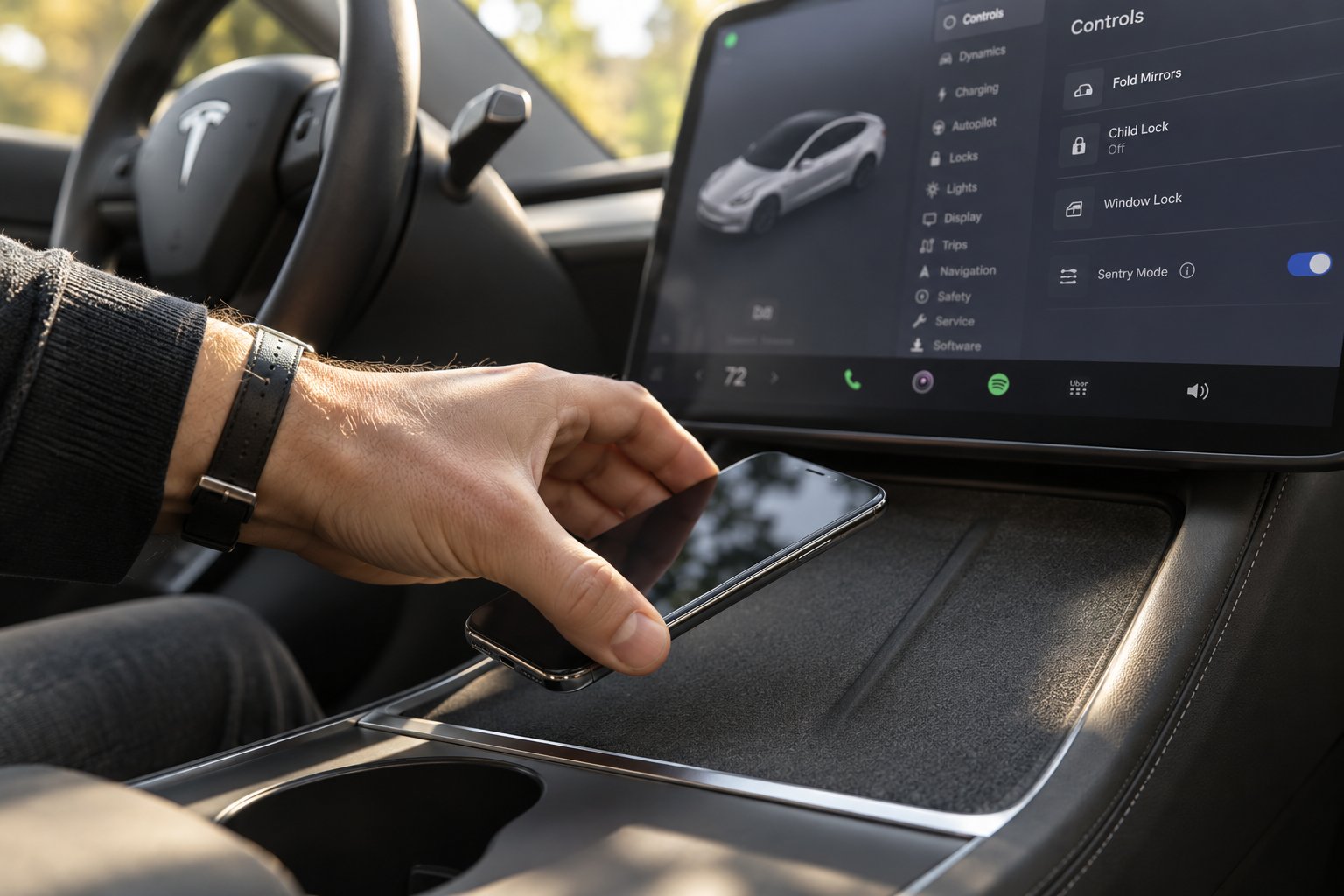
A recent and genuinely useful addition is a software toggle that lets you turn the wireless charging pad on or off entirely. You will find it under Controls > Charging > Wireless Phone Charger on the touchscreen. If your phone keeps overheating or cycling between connected and disconnected states, disabling the pad and switching to USB-C is a perfectly valid short-term fix while you investigate further.
What should you do when charging behavior changes right after an update? Check Tesla owner forums and release notes for your specific software version. Other owners experiencing the same issue will surface quickly in these communities, and Tesla occasionally rolls out follow-up patches to address unintended side effects. Patience — paired with a USB-C cable as a backup — goes a long way here.
Common Hardware and Alignment Fixes
When the problem is not software-related, it is almost always physical. Something between the pad's coil and your phone's coil is preventing the electromagnetic handshake that initiates charging. Working through the following sequence from simplest to most involved will isolate the issue faster than random troubleshooting:
- Confirm your phone supports Qi wireless charging. This sounds obvious, but not every smartphone includes Qi hardware. Budget and mid-range Android phones frequently omit it. Check your phone's specifications before assuming the pad is at fault.
- Remove the phone case entirely and test bare-phone charging. As covered in the compatibility section, thick cases, metal plates, wallet attachments, and even certain MagSafe accessories can block or weaken the charging signal. If the bare phone charges normally, the case is your culprit — not the pad.
- Clean the pad surface. Dust, crumbs, sand, and even dried liquid residue create a thin insulating layer between the coils. Wipe the pad with a soft, slightly damp microfiber cloth. Avoid harsh chemicals that might damage the rubberized surface.
- Check for foreign objects or debris underneath the phone. A stray coin, paperclip, credit card, or even a foil gum wrapper sitting on the pad can confuse the charging circuit. Qi pads include foreign object detection — when the pad senses metal that is not a phone, it may refuse to initiate charging as a safety precaution to prevent overheating.
- Restart the car's infotainment system. Hold down both scroll wheels on the steering wheel for about 10 seconds until the touchscreen goes black and reboots. This soft reset clears temporary software glitches that can affect USB and wireless charging subsystems without impacting your driving settings or saved preferences.
- Try repositioning the phone on the pad. Even a few millimeters of offset can break the coil-to-coil connection, especially on phones with off-center coil placement or prominent camera bumps that prevent the device from lying flat. Gently slide the phone around until you feel or see the charging indicator activate, then leave it in that sweet spot.
- Check whether the vehicle is actually powered on. The wireless pad only delivers power when the car's systems are active — meaning the touchscreen is on and the vehicle senses an occupant. After you exit and the car goes to sleep, the pad stops delivering power unless a feature like Sentry Mode keeps the electronics alive. If you are sitting in a parked car and the screen has timed out, simply tap the brake pedal or touch the screen to wake the system.
- As a last resort, inspect the charging pad connector. On pre-Highland Model 3s, the wireless charging pad connects to the car's electrical system through a cable and connector beneath the center console trim. Road vibrations or aggressive console removals (for cleaning or accessory installation) can loosen this connection. If you are comfortable removing the console panel, visually verify the connector is fully seated. On Highland models, be cautious — the pad is secured with melted plastic posts rather than screws, and removal can damage the console trim if done incorrectly.
If the pad still refuses to charge after working through every step above, the issue may be a hardware failure in the charging module itself. Tesla service can diagnose the module directly, and a software reinstall may be required after a charger replacement to re-establish communication between the new module and the vehicle's systems. This is a service center procedure, not a DIY fix.
Temperature-Related Charging Failures
Here is the environmental factor that almost nobody talks about — and it explains some of the most confusing "my gen 3 charger just randomly stops" complaints. Wireless charging generates heat by nature. The electromagnetic transfer between the pad coil and the phone coil is not perfectly efficient; the lost energy converts to thermal energy. In a climate-controlled living room, that extra warmth dissipates harmlessly. Inside a car parked in direct summer sun? The math changes dramatically.
A Model 3's center console can reach surface temperatures well above 45°C (113°F) on a hot day before you even place a phone on it. Add the heat generated by inductive charging itself, and the phone's internal temperature climbs fast. Modern smartphones include thermal protection circuits specifically designed to prevent battery damage — when the phone's sensors detect excessive heat, the device throttles performance, dims the screen, and pauses wireless charging entirely. You will typically see an on-screen warning about temperature, and charging will not resume until the phone cools down.
This is not a defect in your tesla magsafe setup, the pad, or the phone. It is physics doing exactly what it should: protecting the lithium-ion battery from thermal runaway. But it does mean that on a 95°F afternoon, your wireless pad may be functionally useless until the cabin air conditioning brings temperatures down. Some owners report needing five to ten minutes of climate running before the pad works reliably after a hot soak.
Cold weather creates the opposite problem. Lithium-ion batteries resist accepting charge when their internal temperature drops below roughly 0°C (32°F). A phone left in a freezing car overnight may refuse to charge wirelessly — or accept only a trickle — until it warms up. The pad itself still generates the electromagnetic field, but the phone's battery management system gates how much current it accepts based on cell temperature.
A few practical habits minimize temperature-related disruptions:
- Pre-condition the cabin. Use Tesla's app to start climate control before you get in the car. A cooler console surface in summer — or a warmer one in winter — gives wireless charging a head start.
- Avoid stacking heat sources. Running navigation, streaming, and wireless charging simultaneously on a hot day compounds heat generation. If the phone feels warm to the touch, switch to a USB-C cable. Wired charging generates significantly less heat than inductive charging for the same power delivery.
- Remove the phone if thermal warnings appear. Continuing to place an overheated phone back on the pad does not help — the thermal protection will just trigger again. Let the device cool in an air-conditioned vent stream before retrying.
Temperature management is one of the hidden realities of relying on wireless charging in a vehicle. A pad that works flawlessly in April might become unreliable in August — not because anything broke, but because the environment shifted. Understanding that distinction saves you from unnecessary service visits and misplaced frustration.
Of course, not every charging limitation calls for troubleshooting. Sometimes the factory pad simply does not deliver what you need, and the smarter move is upgrading the hardware rather than working around its constraints.
Aftermarket Upgrades vs Factory Wireless Charging Pads
Knowing the factory pad's limits is half the equation. The other half is figuring out whether those limits actually matter for your daily driving — or whether an aftermarket tesla model 3 wireless charger would genuinely improve your experience. The answer is not the same for every owner, and spending money on an upgrade you do not need is just as frustrating as living with a setup that falls short.
When the Factory Pad Is Good Enough
If you drive a mid-cycle refresh or Highland Model 3 with the built-in Qi pad, you already have a solution that handles light-to-moderate phone use without any extra purchases. The factory pad sits flush with the center console, requires zero installation, and charges two phones simultaneously through independent coils. For errands around town, a relaxed highway cruise, or any drive where your phone is mostly idle with the screen off, the built-in pad does exactly what it should — quietly adds charge in the background without cables cluttering the console.
There is also an aesthetic argument worth considering. Tesla designed the console as a single integrated piece. The factory pad's recessed, non-slip surface matches the surrounding trim perfectly, and nothing protrudes, clips on, or sticks out. Owners who chose a Tesla partly for its clean interior may find that any aftermarket accessory — no matter how well-reviewed — introduces visual noise they would rather avoid.
The practical threshold is straightforward: if your phone consistently gains charge during your typical drives, and you are not bothered by the lack of magnetic alignment or faster wattage, the factory pad is doing its job. Upgrading for the sake of upgrading rarely makes sense.
When an Aftermarket Upgrade Makes Sense
Several real-world scenarios shift the calculus toward spending on a wireless phone charger for Tesla use that goes beyond the factory hardware — or fills a gap where no factory hardware exists at all.
You own a 2017–mid-2020 Model 3 with no factory pad. This is the most clear-cut case. Your car shipped without any wireless charging capability, and a console drop-in pad is the simplest way to add it. Aftermarket options designed for the original console tray install in minutes, and the better ones deliver 10W to 15W per phone — matching or exceeding what mid-cycle factory pads provide.
You need higher charging wattage. The mid-cycle factory pad caps around 7.5W for most phones, and even the Highland pad tops out at 15W under ideal conditions. Aftermarket replacements like MagSafe-compatible dual chargers rated at 25W per side nearly double that output. For owners who run power-hungry apps during every drive, the extra wattage can mean the difference between a phone that slowly gains charge and one that slowly loses it.
You want magnetic alignment. Tesla's factory pad uses standard Qi without any magnetic snap. If you are tired of nudging your phone around the pad's surface trying to find the coil's sweet spot, an aftermarket pad with MagSafe-compatible magnetic pucks locks the phone into perfect alignment every time. That magnetic grip also prevents the phone from sliding during hard braking or aggressive turns — a common complaint with flat, non-magnetic factory surfaces.
You prefer your phone at eye level for GPS visibility. A flat console pad hides the phone below your natural line of sight, which is fine if you rely on the Tesla touchscreen for navigation but inconvenient if you prefer Google Maps, Waze, or another phone-based app. Screen-mounted, vent-mounted, or dashboard-mounted holders with integrated wireless charging put the phone where you can actually see it. This is the upgrade that addresses a workflow problem, not just a wattage problem.
One important warning runs through all of these categories: magnetic mounts vary wildly in what they actually deliver. Some include genuine wireless charging coils and power circuits. Others are passive holders — strong magnets that grip your phone beautifully but deliver zero power. The distinction is not always obvious from product photos or even titles. Before purchasing any mount marketed for tesla model 3 wireless phone charging, confirm explicitly that the listing specifies Qi, Qi2, or wireless charging capability. If it only mentions "magnetic" or "MagSafe-compatible" without referencing power delivery, assume it is a holder only.
| Charger Type | Typical Wattage | Installation Difficulty | GPS Visibility | Best For |
|---|---|---|---|---|
| Console drop-in pad | 10W–25W per phone | Easy — slides into existing console tray; no tools required on most models | Low — phone sits below sightline in the console | Owners of pre-2020 Model 3s without a factory pad; drivers who want higher wattage or magnetic alignment while keeping the console layout clean |
| Screen-mounted holder with charging | 7.5W–15W | Moderate — clamp or adhesive attaches to screen bezel or base; some models require careful alignment to avoid scratching | High — phone sits near the main touchscreen at eye level | Drivers who rely on phone-based navigation apps and want the display visible without looking down; rideshare and delivery drivers |
| Vent-mounted charger | 10W–15W | Easy — clips onto horizontal vent slats; Tesla-specific clips recommended to avoid slat damage | Medium — phone is visible but positioned lower than a screen mount | Drivers who want a quick-install option with decent visibility and some natural airflow cooling behind the phone |
| Dashboard-mounted charger | 7.5W–15W | Easy to moderate — adhesive pad or suction cup on dash surface; suction cups may struggle on Tesla's textured dash material in heat | High — phone sits above the console in the driver's forward field of view | Owners who prefer a phone position independent of the screen and vents; drivers with Highland or Juniper interiors where vent geometry limits clip-on options |
A few details from the table deserve a closer look. Vent-mounted chargers carry a subtle advantage that owners in hot climates appreciate: the phone sits in the path of air conditioning airflow rather than lying flat on a sun-heated console surface. That natural cooling effect can prevent the thermal throttling issues covered in the troubleshooting section, keeping the phone charging steadily where a console pad might pause. As DHgate's Tesla mount guide notes, however, Tesla's slim vent slats are narrower than those in most other cars, so generic vent clips often wobble or stress the plastic — always choose clips explicitly designed for the Model 3's vent geometry.
Screen-mounted holders introduce a different tradeoff. They deliver excellent GPS visibility and keep your phone within easy reach, but extended arms and heavy phones can introduce wobble on rough roads. The more the arm extends from the screen, the more bounce you get — a pattern that holds true across brands and price points. If your phone is a larger Pro Max or Ultra model, a shorter arm or a stiffer bracket will outperform a long, flexible gooseneck every time.
Dashboard mounts, meanwhile, face an adhesion challenge unique to Tesla. The soft-touch dash surface in many Model 3 trims does not grip suction cups reliably, especially when the interior heats up during summer parking. Adhesive pads hold better but can leave residue when removed. For Highland and Juniper interiors with revised dash materials and angles, confirming mount compatibility with the specific refresh generation — not just "Model 3" in general — prevents the disappointment of a mount that looked perfect online and sits crooked on your particular dashboard.
Ultimately, the right upgrade depends on a collision of personal factors: your Model 3's generation, how heavily you use your phone while driving, whether GPS visibility or a clean console matters more to you, and how much you are willing to spend. That final decision — matching the right setup to how you actually drive — is where the practical rubber meets the road.
Choosing the Right Wireless Charging Setup for Your Model 3
Every upgrade option, every wattage number, and every mount style covered so far points toward one deceptively simple question: which setup actually fits your life? Not the life of a tech reviewer with a brand-new Highland and the latest iPhone, but yours — your specific generation, your phone, your case, and the way you actually spend time behind the wheel. Getting that match right is the difference between a tesla wireless charging pad that quietly does its job and an accessory that collects dust in a drawer after two weeks.
Before reaching for a credit card, it helps to know exactly where other buyers have stumbled.
Common Pitfalls to Avoid Before You Buy
Most purchasing mistakes are not about picking a "bad" product. They are about picking the wrong product for the wrong car, phone, or use case. These are the errors that show up repeatedly in owner forums and return-request threads:
- Buying a charger incompatible with your specific Model 3 generation. A drop-in pad designed for the original 2017–2020 console tray will not fit a Highland center console, and vice versa. Console dimensions, USB port locations, and internal clearances changed with each hardware era. Always confirm the exact production year range listed on the product page before purchasing.
- Assuming all Qi pads fit every console revision. Even within the same generation, Tesla revised console trim and charging module hardware — like the clip-secured versus screw-secured dock split in 2024. A "fits Model 3" label without a specific year range is a red flag, not a guarantee.
- Not accounting for phone case thickness. You found the perfect pad, installed it, placed your phone down... and nothing happens. Thick rugged cases, wallet folios, and cases with metal plates block or weaken the Qi signal. If you are not willing to switch to a slimmer case, factor that into which charger you choose — higher-wattage pads with stronger coils push through thicker materials more reliably than budget 5W options.
- Expecting full-speed charging from budget pads. A $15 aftermarket pad advertising "15W fast charging" may technically contain a 15W-capable coil, but cheap power management circuitry, poor thermal design, and inconsistent coil alignment often deliver real-world performance closer to 5W–7.5W. You get what you pay for — especially with wireless charging hardware, where thermal management and coil quality directly determine output.
- Confusing magnetic mounting with wireless charging capability. This one deserves repeating because it accounts for a surprising number of "my tesla wireless charging pad is not working" complaints. A mount labeled "MagSafe-compatible" may simply mean it uses magnets to grip your phone. Unless the listing explicitly states Qi, Qi2, or wireless charging with a wattage spec, you are buying a holder — not a charger. The magnets hold your phone beautifully. They deliver zero power.
Avoiding these five mistakes eliminates the vast majority of buyer regret. Everything else comes down to matching the charger style to your driving habits.
Matching Your Setup to How You Actually Drive
Your ideal charging setup reveals itself when you think honestly about two things: how you use your phone in the car and what annoys you about your current arrangement.
Daily commuters who rely on phone-based GPS — If Waze, Google Maps, or Apple Maps lives on your phone screen every morning, a flat console pad is working against you. The phone is hidden below your sightline, and you are either glancing down constantly or ignoring the navigation you launched in the first place. A screen-mounted or dashboard-mounted holder with integrated wireless charging solves both problems at once: the phone stays visible at eye level while tesla charging phone functionality keeps the battery topped off. Rideshare and delivery drivers benefit from this setup even more, since extended screen-on time makes GPS visibility and sustained power delivery non-negotiable.
Casual and weekend drivers — If your phone mostly sits idle during drives — screen off, no navigation, maybe light Bluetooth audio — the factory console pad (on mid-cycle and Highland models) or a simple aftermarket drop-in pad (on pre-2020 models) is all you need. The phone gains charge passively, the console stays clean, and there is nothing mounted, clipped, or stuck to any surface. Simplicity wins when power demands are low.
Owners in extreme climates — If you regularly deal with blistering summers or freezing winters, consider a vent-mounted charger. Placing the phone in the path of climate-controlled airflow naturally mitigates the thermal throttling that plagues flat console pads in temperature extremes. It is a small repositioning choice that can mean the difference between consistent charging and a phone that pauses every few minutes waiting to cool down.
Pre-2020 Model 3 owners starting from scratch — You have the most flexibility and the most decisions to make. No factory pad means you can choose any aftermarket style without worrying about redundancy. A high-wattage console drop-in pad gives you the closest-to-factory experience, while a mounted holder lets you leapfrog the console entirely and jump straight to an eye-level charging solution.
For owners exploring phone mounts that combine secure magnetic placement with wireless-charging options, CUTIM's phone mounts and holders collection brings together magnetic, vent-mounted, and dashboard-mounted options designed specifically for Tesla vehicles. The range covers different mounting styles and phone sizes, which is helpful when you are trying to narrow down format before committing. That said, always confirm that your selected mount explicitly supports wireless charging — not just magnetic attachment — and verify compatibility with your specific phone, case thickness, and Model 3 generation before purchasing. A mount that fits a 2021 Model Y phone charger setup perfectly may need a different bracket or clip for a Highland Model 3, and wireless charging capability varies across product lines even within the same retailer.
The best Tesla Model 3 wireless charging setup depends on four factors working together: your Model 3 generation, your phone model, your case, and whether you prioritize charging speed or GPS visibility. No single product is universally "best" — only best for your specific combination.
That is the honest takeaway after decoding every generation, every phone, and every charging scenario. Wireless charging in a Model 3 is not a single feature — it is an ecosystem shaped by your hardware, your habits, and your environment. Identify where you fall in that matrix, avoid the common pitfalls, and the right solution becomes obvious. Whether that means trusting the factory pad you already have, adding a drop-in upgrade to an older console, or mounting a powered holder at eye level for daily navigation, the goal is the same: a phone that stays charged, stays visible when you need it, and never makes you think about cables again.
Tesla Model 3 Wireless Phone Charging FAQ
1. Does the Tesla Model 3 come with wireless phone charging?
It depends on when your Model 3 was built. Vehicles produced from 2017 through mid-2020 shipped without a factory wireless charging pad and require an aftermarket Qi pad. Starting in mid-2020, Tesla added a dual-zone Qi wireless charger as standard equipment. The 2024 Highland refresh upgraded the pad further with up to 15W output and a redesigned console. Checking your production date is the fastest way to confirm what your car includes.
2. Why is my Tesla Model 3 wireless charger not working?
Common causes include thick or metal-backed phone cases blocking the Qi signal, foreign metal objects on the pad triggering safety shutoffs, misaligned coil placement, or software glitches after an over-the-air update. Temperature extremes also play a role — a sun-heated console can trigger your phone's thermal protection, pausing charging entirely. Start by testing with a bare phone on a clean pad surface, restart the infotainment system via the scroll-wheel reboot, and check for debris. If nothing resolves it, a loose pad connector or a failed module may require Tesla service.
3. Can I use MagSafe with the Tesla Model 3 wireless charging pad?
Yes, MagSafe iPhones charge on the Tesla pad using the standard Qi protocol at up to 7.5W. However, the factory pad does not contain magnets, so you won't get the magnetic snap-to-align feature or full MagSafe charging speeds (up to 25W). MagSafe cases won't interfere with charging, but they won't improve coil alignment either. For magnetic alignment on a Tesla console, aftermarket MagSafe-compatible drop-in pads with built-in magnetic pucks are available. Retailers like CUTIM offer magnetic and wireless-charging mount options designed for Tesla vehicles, though buyers should always verify that a specific product includes actual Qi charging and not just magnetic grip.
4. Does Tesla Model 3 wireless charging work while using GPS navigation?
It works, but performance varies significantly based on your pad's wattage and phone usage. Running GPS navigation with the screen on can draw 5W to 10W, while the mid-cycle factory pad delivers only 5W to 7.5W — often resulting in a net battery loss. Highland pads with up to 15W fare better but still struggle when navigation, streaming, and calls run simultaneously. For heavy phone use during drives, a wired USB-C connection delivering 18W or more remains the most reliable way to keep your battery climbing.
5. What aftermarket wireless chargers work best for the Tesla Model 3?
The best option depends on your Model 3 generation and driving habits. Pre-2020 owners benefit most from console drop-in Qi pads that fit the original tray without modification. Drivers who use phone-based GPS should consider screen-mounted or vent-mounted holders with integrated wireless charging for better visibility. High-wattage aftermarket pads (15W to 25W) suit owners who need faster charging than the factory pad provides. Always confirm the charger specifies your exact Model 3 production year, supports Qi or Qi2 (not just magnetic mounting), and accommodates your phone case thickness before purchasing.